What is CircuitLab?
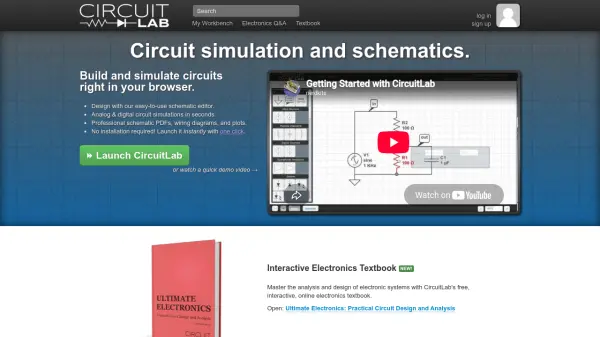
CircuitLab is an online, browser-based platform for schematic capture and circuit simulation. It allows students, hobbyists, and professional engineers to design and analyze analog and digital electronic circuits without installing any software. The intuitive schematic editor lets you build circuits quickly, while the powerful mixed-mode simulation engine provides accurate analog and digital simulation results.
With CircuitLab, you can create professional-quality schematics, wiring diagrams, and plots that can be exported as PDF, PNG, EPS, or SVG. The tool also features an interactive electronics textbook, an active Q&A community, and a library of example circuits. CircuitLab is ideal for learning electronics, rapid prototyping, and design documentation.
Features
- Schematic Editor: Easy-to-use editor with Smart Wires technology for fast circuit design.
- Mixed-Mode Simulation: Simulate both analog and digital components side-by-side.
- Professional Export: Export schematics and plots as PDF, PNG, EPS, or SVG.
- Interactive Textbook: Includes the 'Ultimate Electronics' online textbook for learning.
- Community Q&A: Built-in forum for asking and answering electronics questions.
- Pre-built Examples: Library of example circuits for common designs.
- Behavioral Sources: Use programmable algebraic sources for custom expressions.
- Signal Plotting: Customizable plotting with markers and calculations on signals.
Use Cases
- Design and simulate analog circuits like amplifiers and filters.
- Create and test digital logic circuits such as counters and gates.
- Rapid prototyping of electronic designs before building physical prototypes.
- Educational tool for learning circuit analysis and electronics theory.
- Documentation of final circuit designs with professional schematics.
- Collaboration: Share circuit designs with colleagues or online communities.
- Simulation of power supplies, signal processing, and mixed-signal systems.
FAQs
-
Is CircuitLab free to use?
CircuitLab offers a free version with core functionality for the benefit of the online electronics community. Paid upgrades are available for professionals, academics, and hobbyists with additional features and commercial use authorization. -
Do I need to install any software?
No. CircuitLab runs entirely in your browser. No installation is required; you can launch it instantly with one click. -
What kind of circuits can I simulate?
You can simulate both analog and digital circuits, including mixed-mode designs. The tool supports SPICE-like component models, behavioral sources, and arbitrary Laplace transfer functions. -
Can I share my circuits with others?
Yes. Each circuit gets a unique URL that you can share. You can also explore and remix public circuits from the CircuitLab community. -
What export formats are supported?
You can export schematics and plots as PDF, PNG, EPS, or SVG for inclusion in design documents or deliverables.