Cinny favicon

Cinny
Yet another matrix client

What is Cinny?

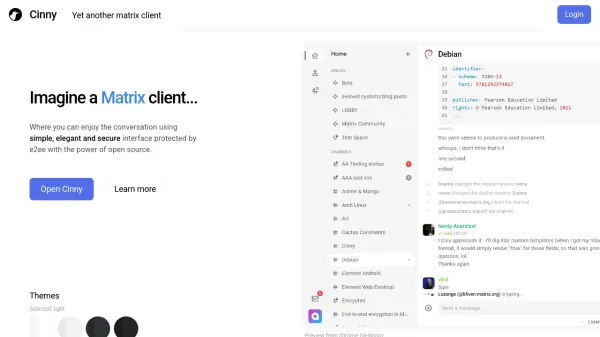
Cinny is a Matrix client designed to provide users with a pleasant communication experience through a simple, elegant, and secure interface. Built on top of Matrix, an open network for secure, decentralized communication, Cinny emphasizes user-friendly design patterns with micro-enhancements to ensure ease of use. The interface is organized to separate direct messages from channels, reducing clutter and offering only necessary visual feedback for better navigation.

The client features a calm visual layout with proper alignment and formatting, creating a comfortable environment for conversations. It adapts to user actions without causing discomfort, making it suitable for various communication needs. As an open-source project, Cinny allows users to inspect, modify, and enhance its source code, promoting transparency and community involvement in its development.

Features

  • Organized Navigation: Separates DMs from channels for easy navigation
  • Clutter-Free Interface: Displays only necessary elements for better visual feedback
  • Adaptive Input: Interface adapts to user actions without causing discomfort
  • Calm Visual Layout: Properly aligned and formatted for a calm feeling
  • Open Source: Source code is available for inspection, modification, and enhancement

Use Cases

  • Secure and decentralized communication through the Matrix network
  • Organized messaging with separate direct messages and channels
  • Community-driven development and customization of communication tools

Blogs:

  • Long Videos into Viral Shorts

    Long Videos into Viral Shorts

    Klap.app is an AI-powered video editing tool that transforms long-form videos into engaging short clips optimized for platforms like TikTok, Instagram Reels, and YouTube Shorts

  • Top 6 AI note-taking tools for 2026: in-person, online, and hybrid use cases

    Top 6 AI note-taking tools for 2026: in-person, online, and hybrid use cases

    Most AI note-taking lists are really lists of meeting bots, which join your video call and transcribe it. That's useful, but it's half the picture. Decisions happen in hallway conversations, client dinners, on-site visits, and hybrid rooms where nobody is on a video link. This guide covers different parts of the note-taking workflow: hardware capture for in-person settings, platform-native tools for online calls, and AI layers for organizing and synthesizing what you've captured. It compares six tools by capture context, workflow fit, pricing, and limitations.

  • Best AI Tools For Startups

    Best AI Tools For Startups

    we've compiled a straightforward list of user-friendly AI tools designed to give startups a boost. Discover practical solutions to streamline everyday tasks, enhance productivity, and gain valuable insights without the need for a tech expert. Learn where and how these tools can be applied in your startup journey, from automating repetitive tasks to unlocking powerful data analysis. Join us as we explore the features that make these AI tools accessible and beneficial for startups in various industries. Elevate your business with technology that works for you!

Didn't find tool you were looking for?

Be as detailed as possible for better results