What is Bidbar?
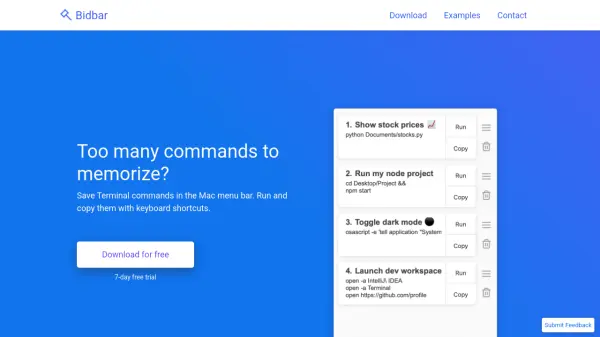
Bidbar provides a streamlined solution for managing terminal commands by storing them directly in the Mac menu bar. Users can save frequently used commands, scripts, or one-liners and execute them instantly through customizable keyboard shortcuts. This eliminates the repetitive task of typing or recalling complex commands manually.
The tool displays command output in detailed notifications and a clean window interface. It supports various command types including git operations, script execution in multiple languages, opening applications or links, and custom system messages. A one-time purchase grants permanent access to all features without recurring subscriptions.
Features
- Command Storage: Save terminal commands, scripts, and one-liners in the Mac menu bar
- Keyboard Shortcuts: Run commands with ⌘⌥ + [1-9] and copy with ⇧⌘⌥ + [1-9] shortcuts
- Output Display: View command results in detailed notifications and a minimal window
- Command Variety: Supports git operations, script execution, app/link opening, and custom messages
- One-Time Purchase: Pay once for permanent access with no recurring fees
Use Cases
- Quickly executing frequently used git commands without typing
- Running complex scripts in Python, shell, or other languages with a single shortcut
- Opening specific applications or web links directly from the menu bar
- Automating repetitive terminal tasks to save time and reduce errors
- Managing hard-to-remember commands for development or system administration