What is Basemark?
Basemark is an automotive software and service company focused on Augmented Reality (AR) and ADAS visualizations. The company's expertise lies in creating HMI graphics for next-generation software-defined vehicles.
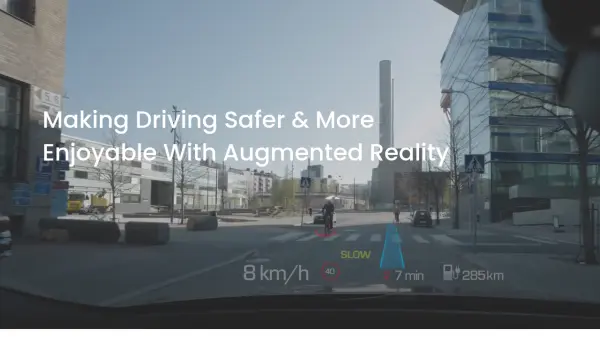
Basemark's Rocksolid AR software suite is specifically designed to address the unique challenges of automotive AR. It can show the right content at the right time, remains anchored to real-world objects regardless of vehicle motion, understands safety critical information, and avoids motion sickness, to ensure safe driving experience.
Features
- Immersive AR Experiences: AR/MR overlays that remain anchored to real-world objects & infrastructure, regardless of vehicle motion or vibration.
- Avoid Occlusion: Automatically understand safety critical information on the road and avoid blocking it with AR content, to ensure a safe & immersive AR experience.
- Prevent Motion Sickness: Create a lag-free experience, that avoids motion sickness, even in harsh driving conditions.
- Any In-vehicle Screen: A lightweight portable AR experience that can fit on low-end chips and power multiple in-vehicle displays at the same time.
Use Cases
- Enhanced driver situational awareness
- Real-time contextual guidance for drivers
- Improved safety alerts in vehicles
- Development of automotive AR applications for HUDs
- AR applications for instrument clusters and infotainment screens