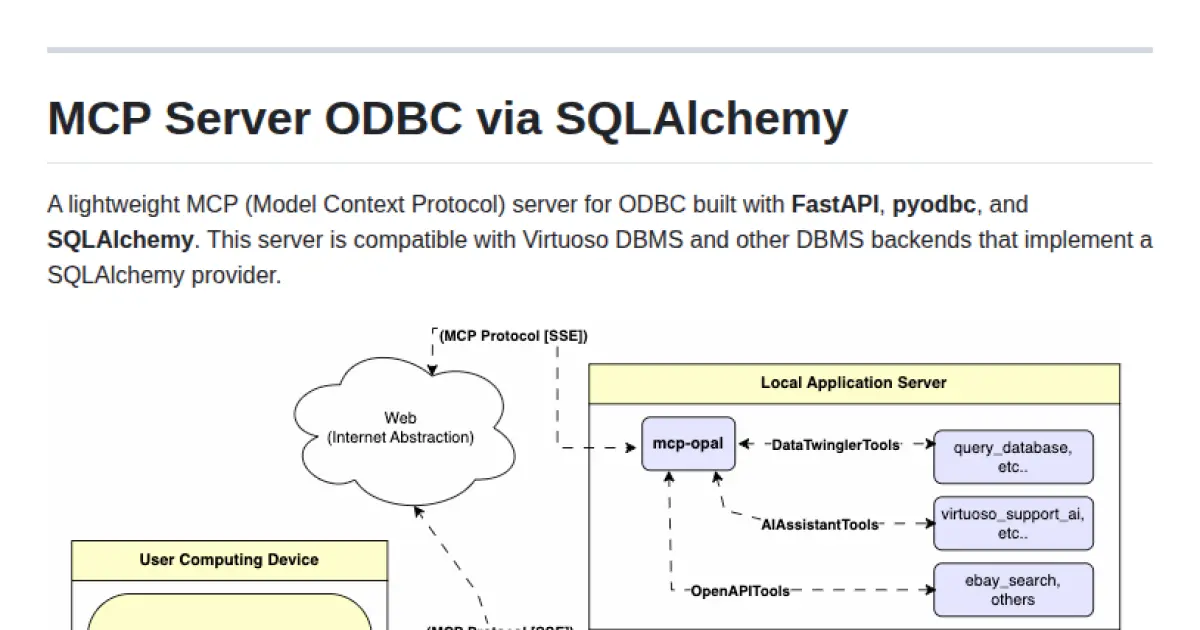
MCP Server ODBC via SQLAlchemy
A lightweight FastAPI server enabling model context protocol access to ODBC-compatible databases via SQLAlchemy.
Key Features
Use Cases
README
MCP Server ODBC via SQLAlchemy
A lightweight MCP (Model Context Protocol) server for ODBC built with FastAPI, pyodbc, and SQLAlchemy. This server is compatible with Virtuoso DBMS and other DBMS backends that implement a SQLAlchemy provider.
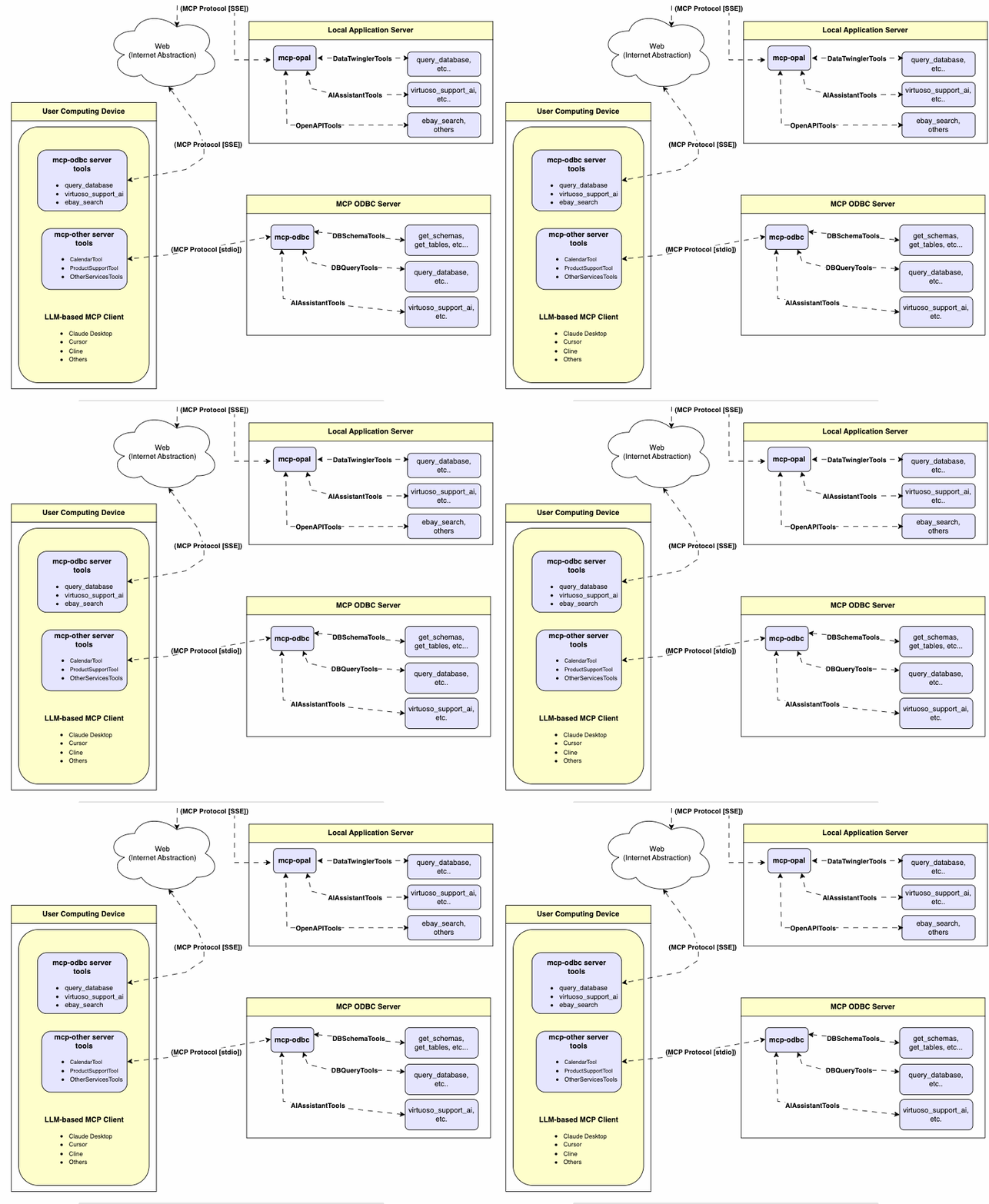
Features
- Get Schemas: Fetch and list all schema names from the connected database.
- Get Tables: Retrieve table information for specific schemas or all schemas.
- Describe Table: Generate a detailed description of table structures, including:
- Column names and data types
- Nullable attributes
- Primary and foreign keys
- Search Tables: Filter and retrieve tables based on name substrings.
- Execute Stored Procedures: In the case of Virtuoso, execute stored procedures and retrieve results.
- Execute Queries:
- JSONL result format: Optimized for structured responses.
- Markdown table format: Ideal for reporting and visualization.
Prerequisites
-
Install uv:
bashpip install uvOr use Homebrew:
bashbrew install uv -
unixODBC Runtime Environment Checks:
-
Check installation configuration (i.e., location of key INI files) by running:
odbcinst -j -
List available data source names by running:
odbcinst -q -s -
ODBC DSN Setup: Configure your ODBC Data Source Name (
~/.odbc.ini) for the target database. Example for Virtuoso DBMS:[VOS] Description = OpenLink Virtuoso Driver = /path/to/virtodbcu_r.so Database = Demo Address = localhost:1111 WideAsUTF16 = Yes -
SQLAlchemy URL Binding: Use the format:
virtuoso+pyodbc://user:password@VOS
Installation
Clone this repository:
git clone https://github.com/OpenLinkSoftware/mcp-sqlalchemy-server.git
cd mcp-sqlalchemy-server
Environment Variables
Update your .envby overriding the defaults to match your preferences
ODBC_DSN=VOS
ODBC_USER=dba
ODBC_PASSWORD=dba
API_KEY=xxx
Configuration
For Claude Desktop users:
Add the following to claude_desktop_config.json:
{
  "mcpServers": {
    "my_database": {
      "command": "uv",
      "args": ["--directory", "/path/to/mcp-sqlalchemy-server", "run", "mcp-sqlalchemy-server"],
      "env": {
        "ODBC_DSN": "dsn_name",
        "ODBC_USER": "username",
        "ODBC_PASSWORD": "password",
        "API_KEY": "sk-xxx"
      }
    }
  }
}
Usage
Database Management System (DBMS) Connection URLs
Here are the pyodbc URL examples for connecting to DBMS systems that have been tested using this mcp-server.
| Database | URL Format |
|---|---|
| Virtuoso DBMS | virtuoso+pyodbc://user:password@ODBC_DSN |
| PostgreSQL | postgresql://user:password@localhost/dbname |
| MySQL | mysql+pymysql://user:password@localhost/dbname |
| SQLite | sqlite:///path/to/database.db |
| Once connected, you can interact with your WhatsApp contacts through Claude, leveraging Claude's AI capabilities in your WhatsApp conversations. |
Tools Provided
Overview
| name | description |
|---|---|
| podbc_get_schemas | List database schemas accessible to connected database management system (DBMS). |
| podbc_get_tables | List tables associated with a selected database schema. |
| podbc_describe_table | Provide the description of a table associated with a designated database schema. This includes information about column names, data types, nulls handling, autoincrement, primary key, and foreign keys |
| podbc_filter_table_names | List tables, based on a substring pattern from the q input field, associated with a selected database schema. |
| podbc_query_database | Execute a SQL query and return results in JSONL format. |
| podbc_execute_query | Execute a SQL query and return results in JSONL format. |
| podbc_execute_query_md | Execute a SQL query and return results in Markdown table format. |
| podbc_spasql_query | Execute a SPASQL query and return results. |
| podbc_sparql_query | Execute a SPARQL query and return results. |
| podbc_virtuoso_support_ai | Interact with the Virtuoso Support Assistant/Agent -- a Virtuoso-specific feature for interacting with LLMs |
Detailed Description
-
podbc_get_schemas
- Retrieve and return a list of all schema names from the connected database.
- Input parameters:
user(string, optional): Database username. Defaults to "demo".password(string, optional): Database password. Defaults to "demo".dsn(string, optional): ODBC data source name. Defaults to "Local Virtuoso".
- Returns a JSON string array of schema names.
-
podbc_get_tables
- Retrieve and return a list containing information about tables in a specified schema. If no schema is provided, uses the connection's default schema.
- Input parameters:
schema(string, optional): Database schema to filter tables. Defaults to connection default.user(string, optional): Database username. Defaults to "demo".password(string, optional): Database password. Defaults to "demo".dsn(string, optional): ODBC data source name. Defaults to "Local Virtuoso".
- Returns a JSON string containing table information (e.g., TABLE_CAT, TABLE_SCHEM, TABLE_NAME, TABLE_TYPE).
-
podbc_filter_table_names
- Filters and returns information about tables whose names contain a specific substring.
- Input parameters:
q(string, required): The substring to search for within table names.schema(string, optional): Database schema to filter tables. Defaults to connection default.user(string, optional): Database username. Defaults to "demo".password(string, optional): Database password. Defaults to "demo".dsn(string, optional): ODBC data source name. Defaults to "Local Virtuoso".
- Returns a JSON string containing information for matching tables.
-
podbc_describe_table
- Retrieve and return detailed information about the columns of a specific table.
- Input parameters:
schema(string, required): The database schema name containing the table.table(string, required): The name of the table to describe.user(string, optional): Database username. Defaults to "demo".password(string, optional): Database password. Defaults to "demo".dsn(string, optional): ODBC data source name. Defaults to "Local Virtuoso".
- Returns a JSON string describing the table's columns (e.g., COLUMN_NAME, TYPE_NAME, COLUMN_SIZE, IS_NULLABLE).
-
podbc_query_database
- Execute a standard SQL query and return the results in JSON format.
- Input parameters:
query(string, required): The SQL query string to execute.user(string, optional): Database username. Defaults to "demo".password(string, optional): Database password. Defaults to "demo".dsn(string, optional): ODBC data source name. Defaults to "Local Virtuoso".
- Returns query results as a JSON string.
-
podbc_query_database_md
- Execute a standard SQL query and return the results formatted as a Markdown table.
- Input parameters:
query(string, required): The SQL query string to execute.user(string, optional): Database username. Defaults to "demo".password(string, optional): Database password. Defaults to "demo".dsn(string, optional): ODBC data source name. Defaults to "Local Virtuoso".
- Returns query results as a Markdown table string.
-
podbc_query_database_jsonl
- Execute a standard SQL query and return the results in JSON Lines (JSONL) format (one JSON object per line).
- Input parameters:
query(string, required): The SQL query string to execute.user(string, optional): Database username. Defaults to "demo".password(string, optional): Database password. Defaults to "demo".dsn(string, optional): ODBC data source name. Defaults to "Local Virtuoso".
- Returns query results as a JSONL string.
-
podbc_spasql_query
- Execute a SPASQL (SQL/SPARQL hybrid) query return results. This is a Virtuoso-specific feature.
- Input parameters:
query(string, required): The SPASQL query string.max_rows(number, optional): Maximum number of rows to return. Defaults to 20.timeout(number, optional): Query timeout in milliseconds. Defaults to 30000.user(string, optional): Database username. Defaults to "demo".password(string, optional): Database password. Defaults to "demo".dsn(string, optional): ODBC data source name. Defaults to "Local Virtuoso".
- Returns the result from the underlying stored procedure call (e.g.,
Demo.demo.execute_spasql_query).
-
podbc_sparql_query
- Execute a SPARQL query and return results. This is a Virtuoso-specific feature.
- Input parameters:
query(string, required): The SPARQL query string.format(string, optional): Desired result format. Defaults to 'json'.timeout(number, optional): Query timeout in milliseconds. Defaults to 30000.user(string, optional): Database username. Defaults to "demo".password(string, optional): Database password. Defaults to "demo".dsn(string, optional): ODBC data source name. Defaults to "Local Virtuoso".
- Returns the result from the underlying function call (e.g.,
"UB".dba."sparqlQuery").
-
podbc_virtuoso_support_ai
- Utilizes a Virtuoso-specific AI Assistant function, passing a prompt and optional API key. This is a Virtuoso-specific feature.
- Input parameters:
prompt(string, required): The prompt text for the AI function.api_key(string, optional): API key for the AI service. Defaults to "none".user(string, optional): Database username. Defaults to "demo".password(string, optional): Database password. Defaults to "demo".dsn(string, optional): ODBC data source name. Defaults to "Local Virtuoso".
- Returns the result from the AI Support Assistant function call (e.g.,
DEMO.DBA.OAI_VIRTUOSO_SUPPORT_AI).
Troubleshooting
For easier troubleshooting:
-
Install the MCP Inspector:
bashnpm install -g @modelcontextprotocol/inspector -
Start the inspector:
bashnpx @modelcontextprotocol/inspector uv --directory /path/to/mcp-sqlalchemy-server run mcp-sqlalchemy-server
Access the provided URL to troubleshoot server interactions.
Star History
Repository Owner

Organization
Repository Details
Programming Languages
Tags
Join Our Newsletter
Stay updated with the latest AI tools, news, and offers by subscribing to our weekly newsletter.
Related MCPs
Discover similar Model Context Protocol servers
Multi-Database MCP Server (by Legion AI)
Unified multi-database access and AI interaction server with MCP integration.
Multi-Database MCP Server enables seamless access and querying of diverse databases via a unified API, with native support for the Model Context Protocol (MCP). It supports popular databases such as PostgreSQL, MySQL, SQL Server, and more, and is built for integration with AI assistants and agents. Leveraging the MCP Python SDK, it exposes databases as resources, tools, and prompts for intelligent, context-aware interactions, while delivering zero-configuration schema discovery and secure credential management.
- ⭐ 76
- MCP
- TheRaLabs/legion-mcp
MCP libSQL by xexr
Secure, protocol-compliant libSQL database server for MCP-enabled clients.
MCP libSQL by xexr provides a Model Context Protocol (MCP) server designed for secure database access and management via libSQL. It enables database operations—such as querying, table management, and schema inspection—through standardized MCP tools, ensuring compatibility with clients like Claude Desktop and Cursor. The project emphasizes robust security validation, audit logging, and comprehensive error handling. Users benefit from production-ready deployment, extensive test coverage, and streamlined integration with MCP-compatible platforms.
- ⭐ 16
- MCP
- Xexr/mcp-libsql
MCP Server for Odoo
Connect AI assistants to Odoo ERP systems using the Model Context Protocol.
MCP Server for Odoo enables AI assistants such as Claude to interact seamlessly with Odoo ERP systems via the Model Context Protocol (MCP). It provides endpoints for searching, creating, updating, and deleting Odoo records using natural language while respecting access controls and security. The server supports integration with any Odoo instance, includes smart features like pagination and LLM-optimized output, and offers both demo and production-ready modes.
- ⭐ 101
- MCP
- ivnvxd/mcp-server-odoo
MCP Alchemy
Directly connect Claude Desktop to SQL databases for expert AI-powered analytics.
MCP Alchemy enables seamless integration between Claude Desktop and a wide range of SQL databases through the Model Context Protocol. It empowers Claude to explore database structure, write and validate SQL queries, analyze relationships between tables, and process large datasets for reporting. The tool is compatible with PostgreSQL, MySQL, MariaDB, SQLite, Oracle, MS SQL Server, CrateDB, Vertica, and any SQLAlchemy-compatible database.
- ⭐ 358
- MCP
- runekaagaard/mcp-alchemy
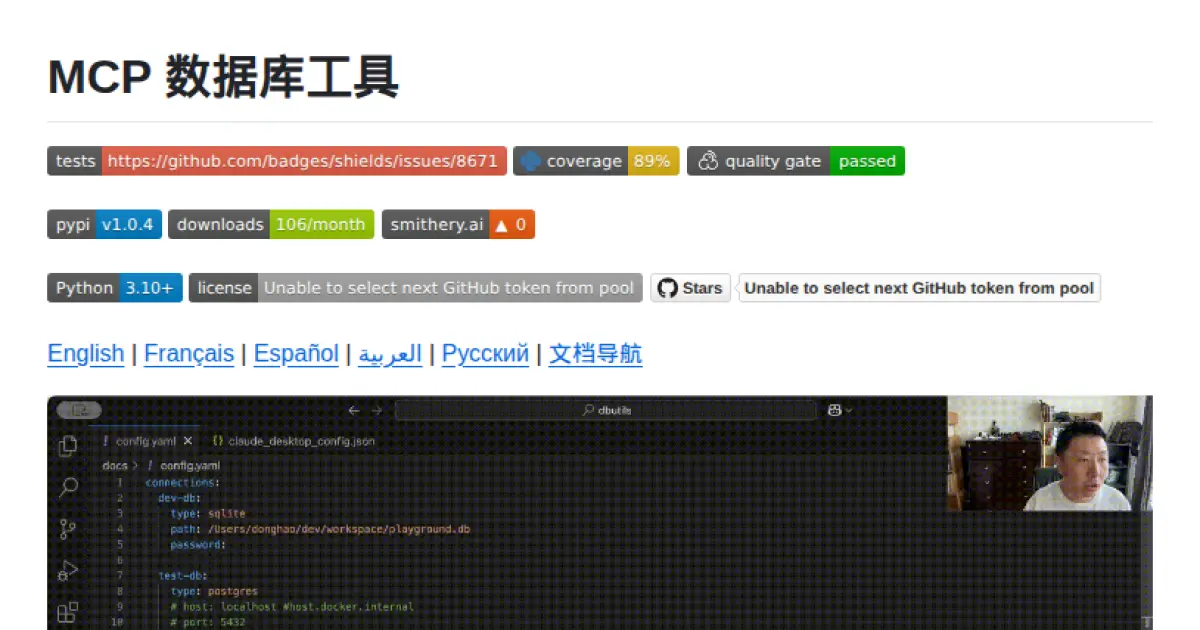
MCP 数据库工具 (MCP Database Utilities)
A secure bridge enabling AI systems safe, read-only access to multiple databases via unified configuration.
MCP Database Utilities provides a secure, standardized service for AI systems to access and analyze databases like SQLite, MySQL, and PostgreSQL using a unified YAML-based configuration. It enforces strict read-only operations, local processing, and credential protection to ensure data privacy and integrity. The tool is suitable for entities focused on data privacy and minimizes risks by isolating database connections and masking sensitive data. Designed for easy integration, it supports multiple installation options and advanced capabilities such as schema analysis and table browsing.
- ⭐ 85
- MCP
- donghao1393/mcp-dbutils
XiYan MCP Server
A server enabling natural language queries to SQL databases via the Model Context Protocol.
XiYan MCP Server is a Model Context Protocol (MCP) compliant server that allows users to query SQL databases such as MySQL and PostgreSQL using natural language. It leverages the XiYanSQL model, providing state-of-the-art text-to-SQL translation and supports both general LLMs and local deployment for enhanced security. The server lists available database tables as resources and can read table contents, making it simple to integrate with different applications.
- ⭐ 218
- MCP
- XGenerationLab/xiyan_mcp_server
Didn't find tool you were looking for?