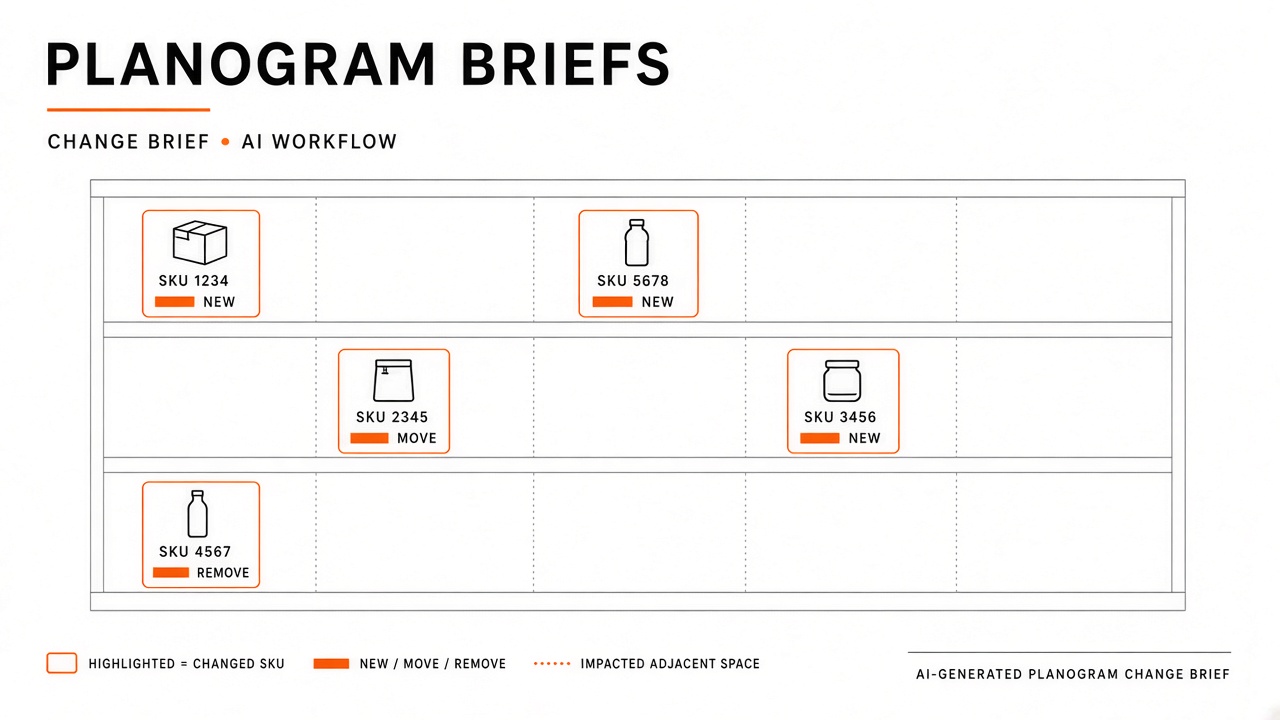
Retail store teams receive planogram updates from headquarters with little time to interpret PDFs, shelf diagrams, and SKU spreadsheets before the next reset window. Associates need a single change brief that shows what moves, what is new, and what leaves the aisle. Category managers spend hours manually annotating differences between planogram versions when communication should reach stores in plain language with visual anchors.
An ai workflow retail planogram briefs routine ingests current and previous planogram files, highlights moves, adds, and deletes, drafts a brief with photos and aisle map references, routes through category manager verification, and distributes via the store portal. AI computes deltas and drafts instructions; category and store leaders confirm accuracy before execution. Retail ops teams often pair brief generation with AI code tooling for planogram parser scripts and AI automation flows for portal publishing once briefs pass review.
Ingest Planogram and Previous Version
Reliable change briefs start by ingesting the approved current planogram and the immediately prior version for the same store format or cluster, with consistent bay and SKU identifiers across both files. AI comparison fails when version labels, UPC formats, or fixture IDs differ between exports. Category analysts validate ingest mappings before delta detection runs.
Supported ingest sources typically include planogram software exports, PDF shelf diagrams, CSV SKU lists with bay and shelf positions, and fixture metadata from space planning tools. Store-specific overrides such as smaller formats or limited assortment clusters should use the correct template family so comparisons reflect what that store actually had on shelf last cycle.
- Register planogram version ID, effective date, and store cluster assignment at ingest.
- Normalize SKU keys to a single internal item ID used in POS and inventory systems.
- Capture bay, shelf, position, facing count, and orientation for each placement.
- Attach prior version with matching cluster ID; reject compare when cluster mismatch.
- Log ingest errors for rows with missing positions rather than guessing shelf placement.
| Ingest artifact | Required fields | Owner |
|---|---|---|
| Current planogram export | Version, cluster, SKU positions | Space planning analyst |
| Previous planogram export | Same schema as current | Space planning analyst |
| Product images | SKU-linked pack shots | Merchandising content team |
| Aisle map reference | Store layout zone IDs | Store operations |
Version Control and Approval Status
Only approved planogram versions marked ready for store communication should feed brief generation. Draft or what-if scenarios in space planning tools must not publish to store portals. Workflow status gates prevent associates from executing unapproved resets.
Highlight Moves, Adds, and Deletes
AI compares normalized planogram records to classify each SKU change as a move, add, delete, or facing adjustment, then ranks changes by bay and aisle for store execution order. Human category staff review edge cases such as SKU replacements, line extensions sharing similar packaging, and mandatory display compliance items that look like minor facing tweaks but carry regulatory weight.
Move detection should report source bay, shelf, and position alongside destination coordinates. Adds include new item introductions with suggested stock quantities when inventory feeds are available. Deletes flag discontinuations and note whether product should be marked down, returned to vendor, or transferred before shelf removal.
- Color-code delta types in brief previews: move, add, delete, facing change.
- Group changes by aisle zone to match how store teams walk the floor.
- Surface high-shrink or age-restricted SKU moves for manager acknowledgment.
- Flag items with pending recall or hold status before brief publication.
- Exclude phantom deltas caused by master data rekeys until analysts confirm true shelf change.
Compliance and Signage Deltas
Some planogram changes require price labels, nutrition panels, or promotional signage updates separate from product placement. AI should tag compliance-driven changes distinctly from assortment shifts so store teams batch label printing and legal sign checks appropriately.
Draft Brief With Photos and Aisle Map Refs
The store-facing brief combines delta tables with product photos, aisle map references, and step-by-step execution notes written for floor associates, not space planning jargon. AI drafts plain-language instructions per bay; category managers edit tone, timing, and priority. Each SKU change should link to a thumbnail and a bay diagram crop when available.
| Brief section | Store team use | AI role |
|---|---|---|
| Reset summary | Scope and deadline | Draft from metadata |
| Aisle walk order | Sequence of bays to rework | Sort deltas by zone |
| SKU change cards | Move, add, delete detail | Generate from compare output |
| Photo and map refs | Visual confirmation on floor | Attach linked assets |
Briefs should state expected labor minutes per aisle when labor planning data exists, so store managers can schedule overnight or early-morning crews. Avoid embedding supplier confidential terms in store-visible text.
Category Manager Verification
Category managers verify every AI-generated brief for assortment accuracy, promotional alignment, and vendor commit compliance before distribution. Verification is a sign-off gate, not a courtesy review. Managers correct misclassified moves, remove items under hold, and confirm reset dates align with ad circulars and inventory arrival windows.
- Review delta summary counts against expected SKU change volume for the reset.
- Confirm new items have receiving dates and backroom capacity notes where relevant.
- Validate promotional placements match current marketing calendar.
- Approve or reject brief with comments routed back to space planning on rejection.
- Lock approved brief version ID for portal publish and store acknowledgment tracking.
Store Manager Feedback Loop
Pilot stores or high-complexity locations may return execution feedback that updates future brief templates. Category managers incorporate recurring confusion points, such as ambiguous bay numbering, into AI prompt guidance and standard brief sections.
Distribution Via Store Portal
Approved briefs publish to the store portal with read receipts, printable PDF exports, and mobile-friendly views for associates on the sales floor. Distribution timestamps should precede physical reset deadlines by a defined lead time so inventory and signage arrive before execution. Automation can notify store managers when new briefs require acknowledgment.
Portal distribution should support filtering by store ID, cluster, and reset wave. Archived briefs remain accessible for audit when execution disputes arise. Integration with task management systems can create checklists per bay when stores use structured execution tracking.
- Push notification to store manager and department leads on publish.
- Provide offline PDF for stores with unreliable floor Wi-Fi.
- Track acknowledgment before reset start date in compliance dashboards.
- Link to training micro-videos for complex fixture changes when available.
- Log portal version viewed during execution disputes.
Execution Confirmation
Some retailers require photo confirmation of completed bays uploaded through the portal after reset. AI can compare execution photos to planogram references for gross misplacement flags, but category managers make final compliance calls. Photo review is optional governance, not a substitute for manager walk-throughs on critical resets.
Automation and Parser Maintenance
Planogram ingest pipelines need versioned parsers when space planning vendors change export formats, with regression tests on sample files before production brief runs. Code-oriented AI assists engineers drafting parser updates, but category analysts validate output on pilot clusters. Automation schedules compare jobs and portal publishes only after category manager approval flags flip in the workflow system.
Document known failure modes such as merged cells in spreadsheets, missing UPC leading zeros, and PDF plans without machine-readable SKU layers. Operations reviews parser error rates monthly so brief quality does not degrade silently during peak reset seasons.
Frequently Asked Questions
How do seasonal resets differ from minor updates?
Seasonal resets typically change entire aisles and warrant full briefs with walk order and labor estimates, while minor updates may publish as delta-only addenda to the prior brief. Workflow rules should define SKU count or bay percentage thresholds that trigger full brief regeneration versus incremental updates.
What compliance photo requirements apply to briefs?
Regulated categories may require specific pack shots, warning labels, or display heights documented in the brief separate from standard product thumbnails. Category managers attach compliance image sets approved by legal or quality teams. AI should not substitute generic stock art for regulated label images.
How should multilingual stores receive briefs?
Publish brief instructions in languages store teams actively use on the floor, with human translation review for safety and compliance sections. Machine translation may accelerate drafts, but category managers approve localized versions before portal release. Keep SKU codes and bay numbers consistent across language variants.
Can vendor-supplied planograms skip comparison?
Vendor planograms still require comparison against the store's prior state or approved chain standard before brief generation. Direct vendor PDF drops without internal normalization often miss cluster-specific edits applied locally. Always run the same ingest and compare pipeline.
Briefs Stores Can Execute
Retail planogram communication improves when current and prior versions ingest cleanly, AI highlights meaningful deltas, briefs combine photos and aisle references in associate-friendly language, category managers verify before publish, and the store portal distributes with acknowledgment tracking. The workflow succeeds when shelves match the approved plan on reset day, not when the PDF merely left headquarters quickly.