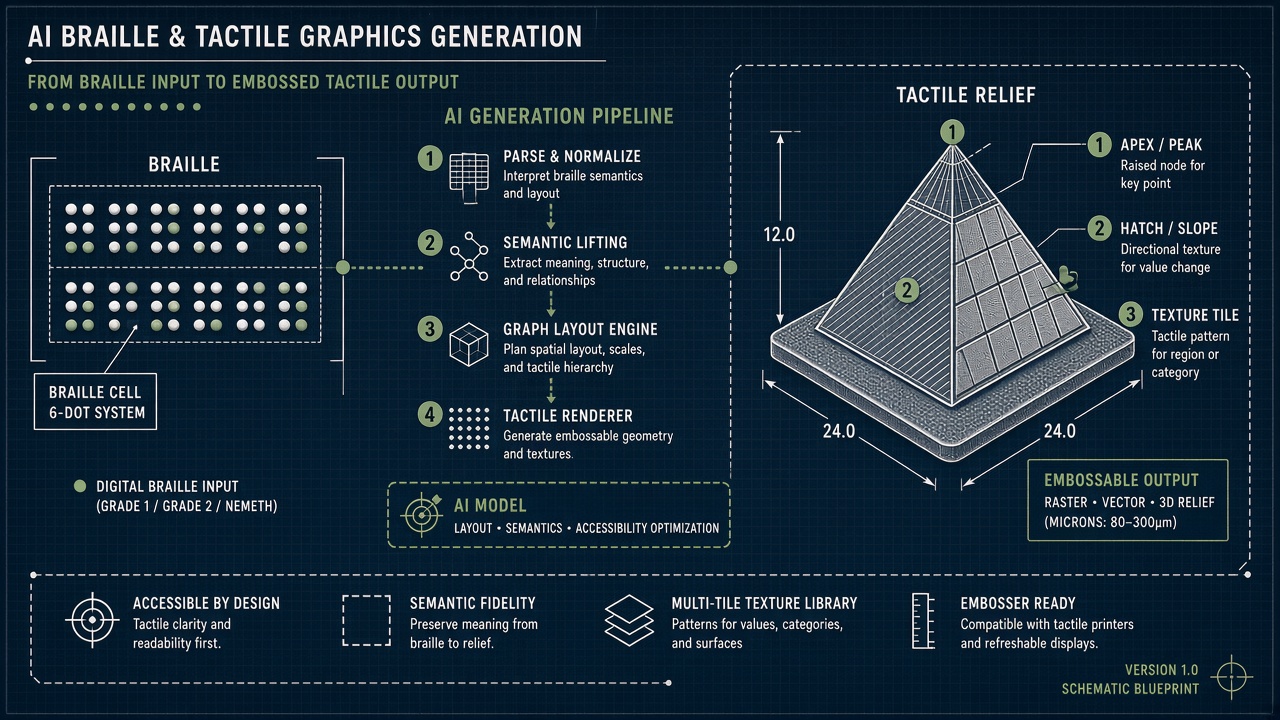
A blind high school student receives a biology worksheet the same day sighted classmates do. The page should include labeled cell diagrams in tactile form, Nemeth braille codes for measurements, and headings a refreshable braille display can navigate. Instead, the district waits two weeks while a transcriber manually redraws graphics on swell paper. AI braille tactile graphics generation promises to compress that timeline by converting scans or natural language prompts into braille-ready files and fabrication-ready reliefs. Teams exploring generative tools alongside AI chatbot tutoring should understand what automation can draft versus what still demands certified human review. Related accessibility research appears on the EliteAI.tools blog index.
Recent systems such as Kanak (OzCHI 2025), StemA11y (BCS HCI 2025), and Text2TactileGraphics (arXiv:2607.22674) show progress on STEM transcription, multisensory mobile delivery, and prompt-driven 2.5D printable graphics. Tactile graphic recognition (TGR) research moves the opposite direction, helping blind users interpret existing graphics through computer vision. None of these pipelines replace the judgment of teachers of the visually impaired (TVIs) and certified braille transcribers today.
What AI Braille Tactile Graphics Generation Means in Plain Language
AI braille tactile graphics generation refers to software that uses optical character recognition, natural language processing, computer vision, and generative models to produce braille text, tactile diagram layouts, and embosser-ready files from printed or digital source materials. Outputs may include BRF (Braille Ready Format) for embossers, SVG or PDF vectors for swell-paper fusers, and 3D-printable height maps for tactile reliefs.
Braille is not a font swap. English braille uses contracted and uncontracted codes; mathematics and science use Nemeth braille codes for mathematical content and specialized chemistry notation. Tactile graphics follow conventions from the Braille Authority of North America (BANA) and similar bodies: line weights, texture fills, and label placement must remain distinguishable by touch. AI that treats braille as Unicode simulation or graphics as pretty pictures fails accessibility review.
| Output type | Typical use | Fabrication method |
|---|---|---|
| BRF braille text | Literary and math worksheets | Embosser or refreshable display |
| Tactile vector graphic | Diagrams, maps, charts | Swell paper or UV fuser |
| 2.5D height map | Complex STEM figures | 3D printer or CNC embossing |
| Audio plus haptic mobile | Interactive exploration | Phone screen haptics, speech |
Tactile graphic recognition (TGR) as the inverse problem
Tactile graphic recognition (TGR) uses computer vision and machine learning to identify shapes, labels, and structure in existing tactile or print graphics so blind users can query them through speech or refreshable displays. TGR complements generation: one pipeline creates new accessible materials; another interprets legacy textbooks already in classrooms. Both require labeled training data scarce compared to mainstream vision datasets.
How the Underlying AI Pipeline Works
End-to-end systems ingest PDFs or photos, segment layout blocks, run OCR on text and math, translate to braille via NLP rules and neural models, simplify graphics for touch readability, and export multi-format files for human proofreading before embossing. Human-in-the-loop control remains the norm in published deployments.
Braille translation and NLP
Rule-based braille translators map print strings to braille cells using contraction tables and context rules. Neural approaches handle ambiguous homographs and inline math better but still hallucinate cells on rare notation. Kanak supports contracted versus uncontracted braille options and Nemeth braille codes for mathematical content in exported BRF and DOCX. Auto-generated braille without transcriber review risks wrong contractions that change word meaning or math expressions that teach incorrect procedures.
Graphic simplification and layout
Vision models detect lines, regions, and text labels in source figures, then apply simplification rules: reduce crossing lines, enlarge minimum touch targets, assign distinct fill textures (dot, dash, crosshatch) per BANA guidance, and reposition labels to avoid overlap. Text2TactileGraphics adds template-guided relief generation and diffusion-based text-to-texture modules that produce tileable normal maps for fabrication-ready 2.5D tactile graphics with strict base flattening so reliefs remain readable by touch and printable without unsupported overhangs.
Embossing and fabrication workflows
Embossing workflows translate digital layouts into physical media: direct braille embossers punch paper, swell-paper fusers heat microcapsules to raise lines, and 3D printers deposit filament in millimeter-scale layers. Each device imposes page size, dot height, and line spacing limits AI export must respect. Kanak exports BRF for embossers; Text2TactileGraphics targets unified 3D-printable meshes validated in user studies with blind and low-vision participants holding printed outputs.
| Stage | AI role | Human role |
|---|---|---|
| Ingestion | OCR, layout detection | Select priority pages |
| Braille translation | NLP, Nemeth encoding | Certified transcriber proofread |
| Graphic redesign | Simplification, texture assignment | TVI validates pedagogical clarity |
| Fabrication | Device-specific export profiles | Physical QA by touch |
Typical workflow steps
- Upload source PDF or scan with resolution sufficient for OCR on small labels.
- Run layout segmentation separating text, math, tables, and figures.
- Generate braille and tactile graphic drafts with contracted or uncontracted settings.
- Route drafts to certified transcriber or TVI for proofreading and pedagogical edits.
- Export BRF, SVG, or 3D mesh to target embosser or printer profile.
- Perform tactile QA with blind reviewer before classroom distribution.
Real Deployments and Published Evidence
Kanak, evaluated with seven accessibility practitioners in an OzCHI 2025 comparative study, automates STEM worksheet transcription into braille, math, tables, and graphics with human-in-the-loop formatting support. Practitioners reported that generative tools complement expert judgment through context-aware formatting, proofreading assistance, and on-demand graphics generation rather than replacing certification workflows.
StemA11y, an AI-driven iOS application studied with 11 blind and low-vision participants, converts math worksheets and adapted SAT papers into speech, haptics, and VoiceOver-navigable content. System Usability Scale scores exceeded the industry benchmark of 68 for both content types (math worksheets M = 75.2, SAT papers M = 83.2). Qualitative feedback highlighted customizable verbosity and flexible navigation as critical design features.
Text2TactileGraphics presents fabrication-ready 2.5D tactile graphics from natural language prompts, jointly generating base geometry, tactile surface textures, and standard-compliant braille within 3D-printable models. User studies with blind and low-vision participants and blindfolded sighted participants preferred generated outputs over baselines when holding physically printed reliefs. International Journal of Human-Computer Studies and ASSETS-adjacent work on AI-generated tactile graphics for children report similar usability gains when experts review educational clarity.
STEM accessibility gap in schools
Blind and low-vision students routinely receive STEM materials late because manual transcription is labor intensive. AI acceleration targets that equity gap, but incorrect Nemeth encoding or oversimplified diagrams can teach wrong concepts. Districts piloting Kanak-like tools still route all output through certified transcribers before IEP deadlines. Speed without accuracy trades one barrier for another.
Multisensory mobile delivery beyond paper
StemA11y demonstrates that AI transcription can skip straight to multisensory phone delivery when embossing is too slow. Speech output, haptic ticks on graph intersections, and VoiceOver rotor navigation let students explore bar charts and equation steps without waiting for a physical page. Customizable verbosity matters: beginners may want every axis label read aloud, while advanced students prefer skipping repeated unit announcements. AI pipelines that only target paper embossing miss this growing channel for same-day access during class.
Refreshable braille displays add another digital path. AI-generated BRF files can stream to forty-cell displays during lecture while a parallel tactile graphic exports to the school swell-paper fuser overnight. Synchronizing braille labels between digital and physical versions remains a versioning challenge production shops solve with explicit revision numbers on each export.
Table-heavy STEM pages stress both braille translation and tactile layout because column alignment must survive simplification. Research systems such as TableNarrator and related accessibility prototypes explore AI that narrates table structure for speech users while parallel pipelines emit grid-like tactile maps. Production workflows still treat tables as expert-only tasks because auto-generated braille tables frequently misalign headers with cell values when OCR confuses merged cells.
Limits, Risks, and Ethical Guardrails
Limitations of auto-generated braille include wrong contractions, mangled math notation, tactile clutter from unfiltered source graphics, and copyright issues when scanning publisher PDFs. Generative textures optimized for visual realism may feel identical under fingertips, defeating the purpose of distinct fill patterns.
- Certification bypass: Shipping AI output without BANA-compliant review harms learners.
- Language coverage: Most research focuses on English UEB and Nemeth; other braille codes lag.
- Device variance: Embosser dot spacing differs; one export profile does not fit all hardware.
- Complex figures: Molecular structures and circuit schematics may need manual sculptural relief.
- Job impact: Transcriber roles should shift to QA and pedagogy, not disappear without transition plans.
Ethical guardrails require certified human sign-off, transparent labeling of AI-drafted materials, co-design with blind adults and TVIs, and refusal to market "instant braille" for high-stakes exams without proven accuracy. WCAG and EPUB accessibility standards address digital braille navigation; physical tactile standards remain separate bodies of practice.
Who Should Use This and Who Should Wait
School districts, university disability services, and braille production shops should pilot AI drafting with mandatory transcriber review to cut turnaround on routine worksheets. Publishers of standardized tests and medical device labeling should wait until accuracy validation matches legal defensibility. Hobbyists experimenting with prompt-to-tactile tools should limit use to personal learning, not classroom distribution.
| Use case | Recommendation | Guardrail |
|---|---|---|
| K-12 worksheet rush jobs | Kanak-style AI plus transcriber QA | TVI checks pedagogical simplification |
| Custom tactile maps | Prompt-driven 2.5D generation | Blind touch review before print run |
| High-stakes exam forms | Wait for certified manual production | No unreviewed Nemeth in tests |
| Museum exhibit labels | AI draft plus tactile UX testing | Test with diverse fingertip sensitivity |
Frequently Asked Questions
Is auto-generated braille safe for classroom use?
Only after certified transcriber or TVI review. Kanak study participants treated AI as drafting aid, not final output. Unreviewed braille can teach incorrect math and vocabulary.
What are Nemeth braille codes?
Nemeth braille codes for mathematical content encode symbols, fractions, and spatial math layout in braille cells distinct from literary braille. AI translators must switch codes at inline math boundaries; errors here are common failure points.
Why cannot visual AI images become tactile graphics directly?
Screen-optimized generative models prioritize visual realism, not touch-discriminable textures, dot heights, or BANA line conventions. Text2TactileGraphics explicitly adds fabrication-aware flattening and texture modules missing from general image models.
What is tactile graphic recognition used for?
TGR helps blind users query existing print or tactile figures through cameras or scanners, complementing generation tools that create new materials. Both need specialized training data.
Which file format goes to an embosser?
BRF (Braille Ready Format) is the common embosser input; some workflows use PEF or device-specific formats after translation software export. AI pipelines should expose BRF plus editable source for corrections.
How much can AI reduce STEM material delays?
Practitioner studies report faster first drafts and proofreading support, but published evidence still requires human QA before distribution. Expect days saved on drafting, not elimination of expert review.
When is 3D printing better than swell paper?
Complex 3D shapes, layered anatomy, and multi-height reliefs benefit from 3D printing; simple line diagrams often remain faster on swell paper. AI export should match the fabrication method chosen by the production shop.
Should students receive contracted or uncontracted braille?
Reading proficiency and age determine contraction level; AI translators must expose both modes because wrong contraction settings slow fluent readers and confuse beginners. TVIs decide per student, not the software default alone.
Conclusion
AI braille tactile graphics generation accelerates drafting of BRF text, Nemeth braille codes for mathematical content, simplified tactile diagrams, and fabrication-ready 2.5D tactile graphics when human experts validate output before embossing. Systems like Kanak, StemA11y, and Text2TactileGraphics demonstrate real usability gains in practitioner and participant studies, while TGR research addresses interpretation of existing figures. Limitations of auto-generated braille and touch layouts remain serious enough to require certified review, device-specific export, and blind-led QA. Deploy AI as a copilot for transcribers and TVIs, not a replacement for tactile literacy standards.