What is SoWork?
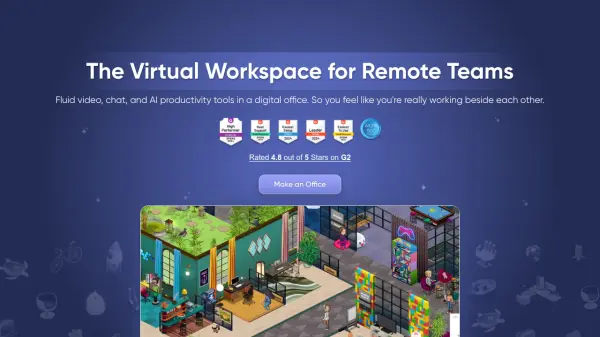
SoWork provides a virtual workspace designed to make remote teams feel like they are working together in a physical office. The platform offers fluid video, chat, and AI-powered productivity tools, creating a digital environment that promotes seamless collaboration and communication.
With features like customizable virtual offices and instant video conferencing, SoWork helps reduce the need for formal meetings and streamlines daily interactions. The integrated AI capabilities provide meeting summaries, action items, and team analytics, enabling more efficient workflows and improved team engagement.
Features
- Customizable Virtual Office: Build your office with a Sims-like Mapmaker, assigning desks for the whole team.
- Instant Communication: Walk up and connect instantly with team members, eliminating the need for scheduled meetings.
- Team Overlap Block: Set a specific time for the entire team to be in the office together daily.
- AI-Powered Meeting Notes: Automatically generate meeting notes, create action items, and export them to your favorite tools.
- Meeting Library: Saves all meetings information such as participants, duration, summaries, recordings, and action items in one place.
- Team Analytics: Provides insights into team collaboration, time-wasters, and potential red flags.
- Mobile App: Access your virtual workspace from anywhere using the SoWork Mobile App.
Use Cases
- Improving team communication and reducing the need for frequent formal meetings.
- Creating a shared virtual workspace for remote teams.
- Enhancing team engagement and collaboration.
- Generating automated meeting summaries and action items.
- Gaining insights into team dynamics and productivity.
- Facilitating spontaneous interactions within a remote team.
FAQs
-
What IS SoWork?
SoWork is your digital office. Your team comes in each day and works beside each other in this shared space that is customized to your unique culture. Your team will feel together, even if you're miles apart. Everyone will know what's happening around the office. Communication will be fast and simple with walk-up-and-connect video conferencing. AI will automate unnecessary work and pull out time-saving insights. With life-like customization, your team will engage with each other (think: decorating someone's desk for their birthday) and your culture (think: starting an 'Engineering Tip of The Day' board at the front door) in ways previously only possible in-person. All of this means your team feels more like a.. team. Work happens faster. People are happier and higher performing. Goals are achieved. -
What makes SoWork a 'Smart' Digital Office?
SoWork incorporates AI to automate tasks like taking meeting notes and creating action items. It also provides insights into team collaboration and productivity. -
How much can I customize?
You can customize your SoWork office extensively, including designing the layout and assigning desks. The Mapmaker tool allows for a Sims-like building experience. -
Can I replace other team softwares with SoWork?
SoWork integrates features similar to Slack, Zoom, Microsoft Teams, and Otter, potentially allowing you to consolidate your tools. -
How do I upgrade my plan to Premium after the trial?
You can upgrade in-app by visiting your Main Menu and choosing the ‘Upgrade Plan’ option.