What is Slipstream?
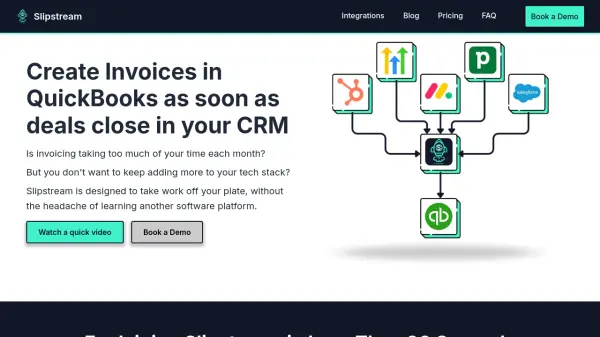
Slipstream is a specialized automation solution designed to simplify the invoicing process for small businesses by directly integrating CRMs like HubSpot, Pipedrive, and Salesforce with QuickBooks. The platform reduces manual data entry and administrative workload, allowing invoices to be generated instantly when deals are closed in your CRM system.
With features such as custom property mapping, multi-invoice processing, and batch invoicing, Slipstream is highly adaptable to businesses with complex invoicing requirements. Onboarding is streamlined, requiring minimal effort from users, and tailored documentation and training are provided to ensure a smooth transition. The solution is fully supported by a transparent pricing model and ongoing customer support.
Features
- CRM Integration: Seamlessly connects with HubSpot, Pipedrive, and Salesforce to automate invoice creation.
- QuickBooks Automation: Instantly generates invoices in QuickBooks upon closing deals in your CRM.
- Custom Property Mapping: Allows tailored mapping of CRM fields to QuickBooks entries.
- Multi-Invoice and Batch Processing: Supports creating multiple invoices and batch operations for streamlined workflows.
- Super Simple Dashboards: Provides optional dashboards for data visibility without being compulsory.
- Tailored Documentation and Training: Offers personalized onboarding materials and training for smooth adoption.
Use Cases
- Automating invoice creation for each closed deal in a CRM.
- Managing complex invoicing with different revenue recognition schedules or product lines.
- Reducing administrative workload in small businesses’ back-office accounting.
- Implementing batch invoicing processes for high-sales volume teams.
- Ensuring accurate and swift data transfer between sales and accounting teams.
FAQs
-
How much time can I save each month with Slipstream?
Slipstream can significantly reduce the time spent on manual invoicing by automating the process as deals close in your CRM, freeing up valuable employee resources for other tasks. -
How secure is your HubSpot QuickBooks integration?
Slipstream’s integration is designed with security in mind, ensuring that your data is transferred safely and remains protected throughout all automated workflows. -
What if I need a custom workflow?
Slipstream accommodates custom workflows and can be tailored to meet specific business requirements, including complex invoicing routines. -
Can I cancel anytime?
Yes, you have the flexibility to cancel your Slipstream subscription at any time. -
What happens if I encounter errors?
If errors occur while using Slipstream, support resources are provided to assist you in resolving issues quickly, ensuring uninterrupted workflow.