What is Phygital+?
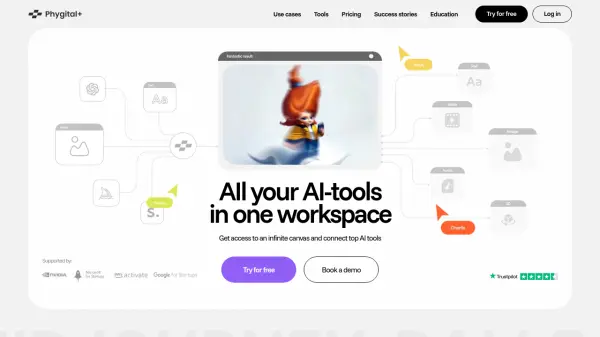
Phygital+ is a comprehensive AI workspace designed for creative professionals and teams across various industries, including marketing, game development, CGI, architecture, and graphic design. It centralizes access to multiple leading AI generation tools like Midjourney, DALLE, Stable Diffusion, and ChatGPT within a single platform, streamlining creative workflows. The platform features an infinite canvas environment enabling real-time collaboration among team members.
Phygital+ allows users to train AI models based on their specific brand guidelines or style preferences, enabling the generation of consistent banners, icons, key visuals, and other assets. It provides pre-built templates tailored for different industry needs, simplifying the creation process for tasks such as 3D icon generation, storyboard creation, virtual product try-ons, logo stylization, outfit changes in images, lettering design, and presentation image generation. Users maintain control throughout the creative pipeline, from text generation and image editing to animation and 3D model transformation.
Features
- Unified Workspace: Access multiple AI tools (Midjourney, DALLE, Stable Diffusion, ChatGPT, FLUX, LoRA) in one interface.
- Infinite Canvas: Collaborate in real-time on a shared workspace.
- Custom AI Training: Train models on brand assets or specific styles for consistent output.
- Industry Templates: Use pre-built templates with tailored prompts for marketing, design, etc.
- Content Generation Suite: Create 3D icons, storyboards, product mock-ups, logos, lettering, banners, and more.
- Image Editing & Upscaling: Refine generated images with inpainting and upscaling tools.
- Character Consistency: Maintain character appearance across storyboard frames.
- Virtual Try-On: Generate product visuals without photoshoots.
- Multi-Format Support: Work with text, images, animation, and 3D.
Use Cases
- Generating brand-aligned marketing visuals (banners, icons).
- Creating storyboards with consistent characters for campaigns or films.
- Developing virtual product try-ons for e-commerce.
- Reimagining logos in various styles or themes.
- Digitally changing outfits in photographs.
- Designing unique lettering for branding.
- Producing on-brand images for presentations and reports.
- Speeding up asset creation for game development.
- Creating architectural visualizations and interior designs.
- Designing visual elements for events.
FAQs
-
What AI tools are integrated into Phygital+?
Phygital+ integrates tools like Midjourney, DALLE (including DALLE-3), Stable Diffusion (including SD3 and SD Video), ChatGPT (including GPT-4o), FLUX, LoRA Train, Inpainting, ControlNet XL, and IP-Adapter XL. -
Can I train the AI on my own brand's style?
Yes, you can upload your images and train an AI model to generate content like banners, icons, and key visuals based on your brand book or chosen style. -
Is there a free plan available?
Yes, Phygital+ offers a Free plan with limited features (7 generations/week, 0 projects) to explore the platform. -
Does Phygital+ support team collaboration?
Yes, the platform offers an infinite canvas for real-time teamwork, idea sharing, and instant updates. There is also a dedicated 'Teams' plan with collaborative features. -
What kind of content can I create with Phygital+?
You can create a wide range of content including 3D icons, storyboards, virtual product try-ons, stylized logos, lettering, banners, presentation images, game assets, and more.