What is OnlineGDB?
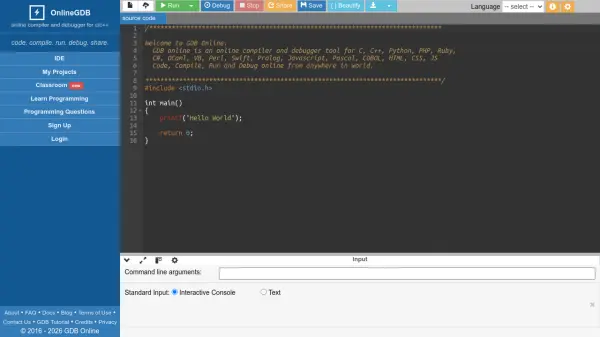
OnlineGDB is a powerful online compiler and debugger that supports a wide range of programming languages including C, C++, Java, Python, PHP, Ruby, C#, and many more. It provides an integrated development environment (IDE) accessible directly from a web browser, enabling users to write, compile, run, debug, and share their code effortlessly. The platform features a user-friendly interface with options to customize editor themes, font sizes, and key bindings to suit individual preferences.
With OnlineGDB, users can easily debug their programs using step-by-step execution, breakpoints, and variable inspection. It also offers a collaborative feature through project sharing and classroom support, making it an ideal tool for students, educators, and developers. The platform is free to use and requires no installation, allowing users to code from anywhere in the world.
Features
- Multi-language Support: Supports over 30 programming languages including C, C++, Java, Python, PHP, Ruby, and more.
- Online Debugger: Provides step-by-step debugging with breakpoints, call stack, variable inspection, and register view.
- Customizable Editor: Offers themes (dark/light), font size adjustments, Emacs/vim modes, and autocomplete options.
- Share Code: Generate shareable links to source code for collaboration.
- Save Projects: Allows users to save and manage their projects online.
- Classroom Support: Features for educators to manage assignments and student work.
- Free to Use: No cost for accessing the compiler and debugger functionalities.
Use Cases
- Learning programming and debugging code online.
- Teaching programming in classrooms without local installations.
- Sharing code snippets with colleagues or peers for collaboration.
- Quickly testing code snippets across multiple languages.
- Debugging complex C/C++ programs with step execution.
FAQs
-
What languages are supported by OnlineGDB?
OnlineGDB supports over 30 programming languages including C, C++, Java, Python, PHP, Ruby, C#, Kotlin, Swift, Rust, Go, and many more. -
Is OnlineGDB free to use?
Yes, OnlineGDB is completely free to use for all its features, including compiling, debugging, and sharing code. -
Do I need to install anything to use OnlineGDB?
No, OnlineGDB runs entirely in your web browser. No installation or setup is required. -
Can I save my projects on OnlineGDB?
Yes, you can save your projects online and access them later by creating an account. -
How can I share my code with others?
You can generate a shareable link to your source code by using the Share button, which copies the code to a permanent link.