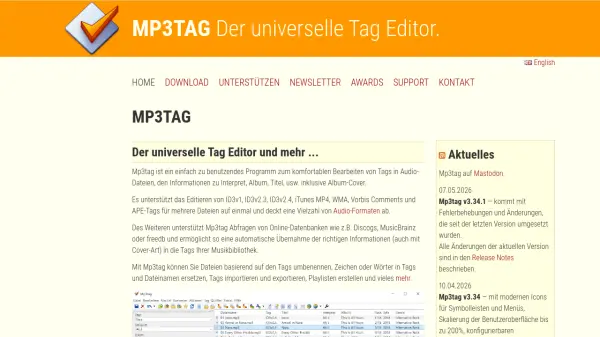
What is mp3tag.de?
Mp3tag is a free and powerful metadata editor designed to simplify the management of audio file tags. It supports batch editing of ID3v1, ID3v2.3, ID3v2.4, iTunes MP4, WMA, Vorbis Comments, and APE tags across a wide range of audio formats, including MP3, FLAC, M4A, OGG, WAV, and more. With Mp3tag, users can easily rename files based on tag information, replace characters or words in tags and filenames, and automatically retrieve correct metadata and cover art from online databases like Discogs, MusicBrainz, and freedb.
The tool also allows for the creation and management of playlists, export of tag data to HTML, RTF, or CSV formats, and full Unicode support for global language compatibility. Additional features include cover art resizing and management, case conversion, and the ability to combine multiple actions into groups for one-click execution. Mp3tag is ideal for organizing large music libraries efficiently.
Features
- Batch Tag Editing: Write and modify ID3v1.1, ID3v2.3, ID3v2.4, iTunes MP4, WMA, APEv2 tags, and Vorbis Comments in multiple files simultaneously.
- Cover Art Support: Download and add album covers to your audio files.
- Online Database Import: Import tags and metadata from Discogs, freedb, MusicBrainz, and other online databases.
- Character and Word Replacement: Replace strings in tags and filenames with support for regular expressions.
- Case Conversion: Change the formatting of filenames and tags to a uniform scheme.
- Automatic Playlist Creation: Create and manage playlists automatically when editing tags.
- Rename Based on Tags: Rename files based on tag information or import information from filenames.
- Export to HTML, RTF, CSV: Create overview lists of your music library using custom templates.
- Full Unicode Support: Edit tags and files in all languages of the world.
- Cover Art Management Dialog: Add, remove, replace, resize, and reorder embedded album covers.
- Selective Tag Removal: Remove specific tag formats (ID3v1, ID3v2, APEv2) and unsupported fields from MP3 files.
Use Cases
- Organizing large music libraries by batch editing metadata and cover art.
- Automatically tagging new music files by querying online databases like Discogs and MusicBrainz.
- Renaming audio files according to artist, album, track number, and other tag fields.
- Creating customized exports of music collections for inventory or sharing.
- Cleaning up and standardizing tag information across multiple audio formats.
- Extracting and resizing embedded cover art for consistency.
FAQs
-
What audio formats does Mp3tag support?
Mp3tag supports a wide range of audio formats including AAC, ALAC, AIFF, DSF, FLAC, MKA, APE, MP3, MP4/M4A/M4B, MPC, OGG, Opus, OFR, SPX, TAK, TTA, WMA, WV, WAV, and WebM. -
Is Mp3tag free?
Yes, Mp3tag is completely free to use for both personal and commercial purposes. -
Can Mp3tag edit tags for multiple files at once?
Yes, Mp3tag is designed for batch editing, allowing you to modify tags for multiple audio files simultaneously. -
Does Mp3tag support Unicode?
Yes, Mp3tag has full Unicode support, enabling you to edit tags and filenames in any language. -
Can Mp3tag automatically fetch album covers?
Yes, Mp3tag can download and add album covers to your files using online databases like Discogs and MusicBrainz.
Helpful for people in the following professions
mp3tag.de Uptime Monitor
Average Uptime
0%
Average Response Time
0 ms