What is MarketBox?
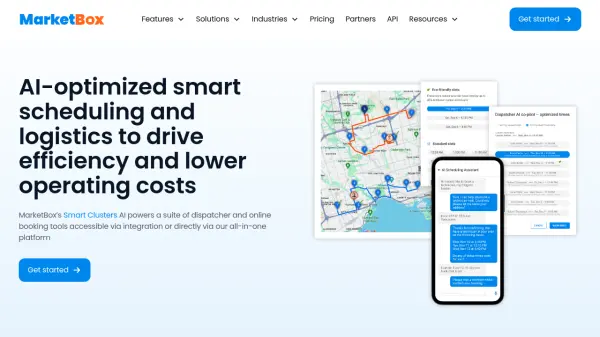
MarketBox leverages its proprietary Smart Clusters AI technology to provide a comprehensive suite of scheduling and logistics tools. The platform intelligently clusters bookings to eliminate gaps, optimizes daily routes for providers, and enables efficient multi-provider scheduling and routing. It offers an online booking engine that allows clients to self-book 24/7, along with integrated payment processing for secure deposits and transactions.
Businesses can utilize MarketBox through various methods, including white-labeling its tools, integrating its APIs into existing products, or using it as an all-in-one platform. The solution seamlessly integrates with popular systems like Salesforce, SAP, Oracle, Stripe, and HubSpot, among others, enhancing operational workflows without requiring a complete system overhaul.
Features
- Smart Clusters: Cluster bookings together to eliminate gaps and reduce travel time
- Dispatcher scheduling tools: Efficient multi-provider scheduling and routing
- Route optimization: Plan and optimize daily routes for providers
- Online booking engine: Let clients self-book 24/7 with branded pages
- Payment processing: Accept online payments and secure deposits
- Integrations: Connect seamlessly with systems like Salesforce, SAP, Oracle, and Zapier
- White label solutions: Use pre-built components in your own system
- API products: Enhance your product suite with robust APIs
Use Cases
- Optimizing scheduling for mobile service providers like swim schools or entertainment companies
- Reducing operational costs by minimizing travel time and schedule gaps
- Enhancing customer experience with faster booking and response times
- Streamlining dispatcher workflows in enterprise environments
- Integrating AI scheduling tools into vertical SaaS platforms
- Managing franchise operations with dedicated scheduling features
- Improving online booking rates for small and medium businesses
- Reducing carbon emissions through efficient route planning
FAQs
-
Can I change my plan later?
Absolutely! You can upgrade or downgrade your plan at any time from the account settings page. -
Do you offer discounts for annual plans?
Yes! If you purchase an annual subscription, you get one month free. -
What if my team grows?
That's fantastic! Just let us know how many new user licenses you need and we'll update the billing on our side. -
Is there a free trial?
Yes! Reach out to our sales team to get access to a 10-day free trial of the platform, where you can use all features in full. -
How does billing work?
Depending on whether you sign up for a monthly or yearly subscription, your card will be automatically charged on the same day every month or year respectively, unless you let us know about any change in users or circumstances.