Logical favicon

Logical
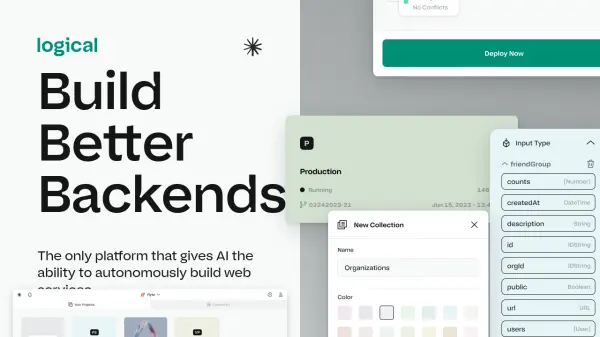
Build Better Backends

What is Logical?

Logical is a platform designed to revolutionize the way web services are built. It leverages AI to autonomously create, test, and deploy code, significantly reducing development time. The platform provides a completely visual interface, eliminating the need for command-line interactions, and manages all infrastructure aspects, including databases, APIs, deployments, and hosting.

With Logical, users can bring systems to market in minutes instead of weeks. It's a full-stack solution that streamlines the entire development process, from provisioning to production, without requiring manual infrastructure management.

Features

  • Visual Development: Build web services without touching the command line.
  • Full Stack Capabilities: One-click setup for databases, APIs, deployments, and hosting.
  • AI-Powered Development: AI teammates can write, test, and deploy code autonomously.
  • Rapid Deployment: Launch systems to market in minutes instead of weeks.
  • Infrastructure Management: Automates infrastructure management.

Use Cases

  • Rapid prototyping of web services
  • Developing and deploying backend systems
  • Building full-stack applications
  • Automating software development workflows
  • Creating web services without command-line interaction

Related Tools:

Blogs:

  • AI tools for video voice overs

    AI tools for video voice overs

    Discover the next level of video production with AI-powered voiceover tools. Enhance your content effortlessly, ensuring professional-quality narration for your videos.

  • Top AI tools for Students

    Top AI tools for Students

    These AI tools are designed to enhance the learning experience for students. From personalized study plans to intelligent tutoring systems.

  • Top 6 AI note-taking tools for 2026: in-person, online, and hybrid use cases

    Top 6 AI note-taking tools for 2026: in-person, online, and hybrid use cases

    Most AI note-taking lists are really lists of meeting bots, which join your video call and transcribe it. That's useful, but it's half the picture. Decisions happen in hallway conversations, client dinners, on-site visits, and hybrid rooms where nobody is on a video link. This guide covers different parts of the note-taking workflow: hardware capture for in-person settings, platform-native tools for online calls, and AI layers for organizing and synthesizing what you've captured. It compares six tools by capture context, workflow fit, pricing, and limitations.

Didn't find tool you were looking for?

Be as detailed as possible for better results