What is Gladys Assistant?
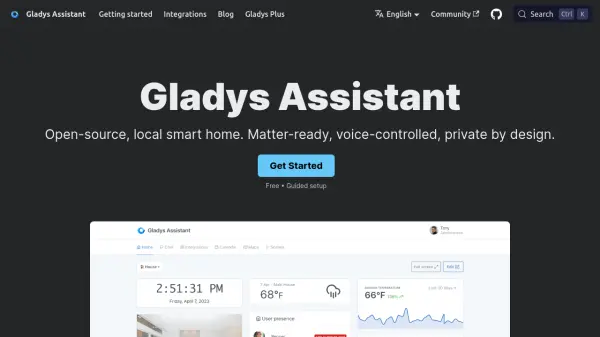
Gladys Assistant is an open-source smart home platform designed to run locally on your own hardware, ensuring your data stays private. It offers a beautiful dashboard to monitor temperature, security cameras, and presence, and allows you to automate your entire day with scenes triggered by time, sensors, or events. The built-in voice assistant responds instantly to commands like "Turn on the light in the kitchen," and you can also control your home via messages on your phone. Gladys supports open protocols such as Zigbee, Matter, MQTT, and Tuya, along with dedicated integrations for Shelly, Sonos, Somfy, and cameras. Installation is guided via Docker, and the interface is clean, fast, and designed for everyday use without a terminal. Optional Gladys Plus service unlocks encrypted remote access, automatic backups, and advanced integrations like AI models and camera streaming.
Features
- Local Privacy: All smart home data stays on your local machine with no mandatory cloud or tracking.
- Voice Control: Built-in voice assistant responds to commands like turning on lights or playing music.
- Automation Scenes: Create automated routines without coding, such as coffee brewing and lights turning on.
- Dashboard: Monitor temperature, cameras, presence, and more from a single, clean interface.
- Broad Integration: Supports Zigbee, Matter, MQTT, Tuya, Shelly, Sonos, Somfy, and RTSP cameras.
- Self-Hosted: Runs on any Linux machine with Docker, including Raspberry Pi, Synology NAS, or mini-PC.
- Auto Upgrades: New features and bug fixes install automatically with zero hassle.
- Gladys Plus: Optional service for encrypted remote access, daily backups, AI models, and camera streaming.
Use Cases
- Automate daily routines like turning on lights, brewing coffee, and playing music.
- Monitor home temperature, humidity, and security cameras from a single dashboard.
- Control devices by voice or via mobile messages from anywhere.
- Set up presence simulation for security when away.
- Create custom scenes triggered by sensors, time, or events.
- Integrate with energy monitoring (e.g., Enedis) to track electricity usage.
- Manage garden irrigation and pool pumps based on water temperature.
- Build a DIY home alarm system with intrusion and water leak detection.
FAQs
-
Is Gladys really free?
Yes, 100% free and open-source. No subscription or credit card needed. You can install it on any Linux machine with Docker. -
Is it hard to install?
It requires some technical steps, but the documentation includes screenshots and videos. You need a Linux machine and Docker. -
Does Gladys work with my devices?
It supports thousands of devices via Zigbee, Matter, MQTT, Shelly, Sonos, Tuya, and RTSP cameras. Missing devices can be handled by Matterbridge or requested on the forum. -
Can I access Gladys remotely?
Yes, through Gladys Plus (recommended) for secure encrypted access, or via your own VPN or reverse proxy (for experts). -
What is the difference between Lite and Plus plans?
Lite includes encrypted remote access, Google Home/Alexa, open API, and family accounts. Plus adds daily encrypted backups, remote camera streaming, Open-Weight AI models, Enedis integration, and MCP server.