What is FrameFlow?
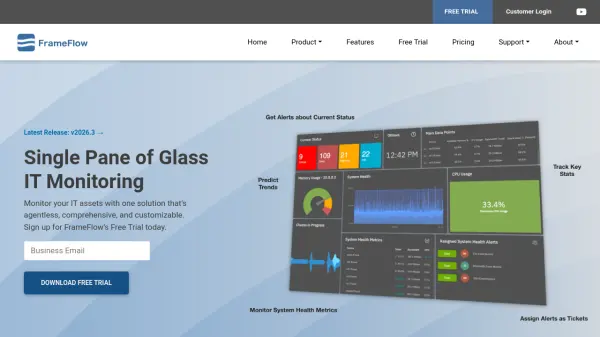
FrameFlow delivers unified IT monitoring through a single pane of glass interface, allowing organizations to monitor servers, networking equipment, cloud services, power equipment, and hardware from one comprehensive solution. The platform runs checks 24×7 to ensure critical systems remain operational and provides customizable alerts with thresholds for warning, failure, and critical conditions to detect issues before they escalate.
The solution features an elegant web-based dashboard editor that enables users to build color-coded status dashboards through point-and-click functionality. FrameFlow monitors various metrics including CPU usage, disk space, memory utilization, bandwidth, interface status, log files, performance counters, and cloud service status. The platform supports monitoring across multiple remote locations and integrates with industry-standard PowerShell scripting for extensibility.
Features
- Unified Monitoring: Single interface for monitoring servers, networks, cloud services, and hardware
- Alert System: Configurable thresholds for warning, failure, and critical conditions with proactive notifications
- Dashboard Creation: Web-based editor for building color-coded status dashboards with drag-and-drop functionality
- Multi-Site Monitoring: Capability to monitor systems across multiple remote locations from one console
- PowerShell Integration: Extensible platform that integrates with industry-standard PowerShell scripting
Use Cases
- Monitoring server performance and availability across an organization
- Tracking network equipment status and bandwidth utilization
- Overseeing cloud service performance and billing metrics
- Monitoring power equipment and HVAC systems in data centers
- Creating comprehensive IT status dashboards for management visibility