Echothreads favicon

Echothreads
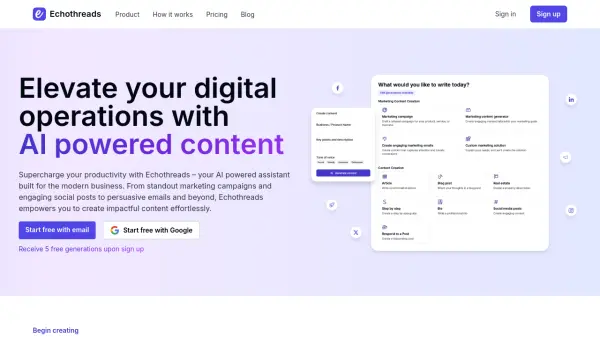
Elevate your digital operations with AI powered content

What is Echothreads?

Echothreads is an AI-powered assistant designed for modern businesses and individuals. It helps users create impactful content effortlessly, streamlining the process of generating marketing materials, social media posts, emails, and much more.

The platform empowers users to enhance their productivity and create standout content. Whether it's for professional or personal use, Echothreads provides the tools to create high-quality content quickly and effectively.

Features

  • Social Media Posts: Generate engaging content with captions and hashtags.
  • Marketing Material: Create blogs, articles, campaigns, and advertising copy.
  • Email Generation: Write conversion-focused marketing emails.
  • Custom Solutions: Request specific content tailored to unique requirements.
  • Personalized Content: Generate speeches, bios, children's stories, cover letters, and personal messages.

Use Cases

  • Creating marketing campaigns.
  • Managing social media presence.
  • Generating professional bios.
  • Writing personalized messages.
  • Developing website content.
  • Crafting children's stories.

Related Tools:

Blogs:

  • Best AI tools for Lawyers

    Best AI tools for Lawyers

    streamline legal processes, enhance research capabilities, and improve overall efficiency in the legal profession.

  • Top 6 AI note-taking tools for 2026: in-person, online, and hybrid use cases

    Top 6 AI note-taking tools for 2026: in-person, online, and hybrid use cases

    Most AI note-taking lists are really lists of meeting bots, which join your video call and transcribe it. That's useful, but it's half the picture. Decisions happen in hallway conversations, client dinners, on-site visits, and hybrid rooms where nobody is on a video link. This guide covers different parts of the note-taking workflow: hardware capture for in-person settings, platform-native tools for online calls, and AI layers for organizing and synthesizing what you've captured. It compares six tools by capture context, workflow fit, pricing, and limitations.

Didn't find tool you were looking for?

Be as detailed as possible for better results