What is DocuWriter.ai?
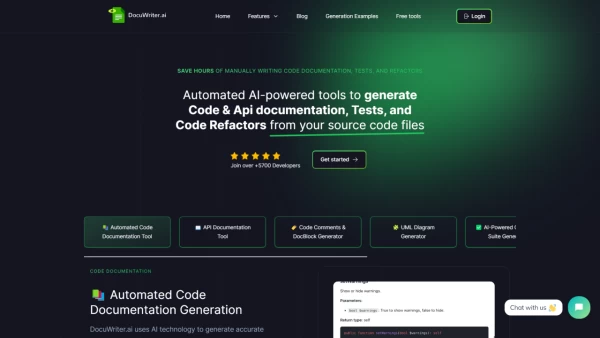
DocuWriter.ai is a powerful AI tool that assists developers by automating the generation of code documentation and API documentation directly from source code files. It simplifies the software documentation process, helping to save precious time that can be dedicated to other crucial development tasks. Furthermore, the tool offers features like automated test suites, intelligent code refactoring, and a code language converter to improve code quality and maintainability while adhering to best practices.
With the ability to handle multiple programming languages and integrate with various tools like Swagger and Postman, DocuWriter.ai provides a comprehensive suite for polishing and optimizing codebases. By offering a smooth transition for converting code from one language to another, the tool ensures swift and efficient project progress. DocuWriter.ai's intention is to become an indispensable asset for individual developers, freelancers, small businesses, and enterprises looking to improve their software documentation and overall code quality.
Features
- Automated Code Documentation Generation: Rapid and accurate documentation for multiple programming languages
- API Documentation: Swagger-compliant and Postman compatible automated generation
- AI-Powered Code Tests Suite Generation: Automated creation of test suites for code reliability assurance
- Intelligent Code Refactoring: Enhances code readability and maintainability using AI
- Code Language Converter: Instantly translates code between various programming languages
- Code Comments & DocBlock Generator: Automatically generates necessary code comments and documentation blocks
- UML Diagram Generator: Automated creation of UML diagrams from source code
Use Cases
- Developing software documentation
- Automating generation of unit tests
- Refactoring existing codebases
- Converting code between different programming languages
- Creating UML diagrams for system design
FAQs
-
What does DocuWriter.ai specialize in?
DocuWriter.ai specializes in automating the generation of code documentation, API documentation, test suites, and code refactoring for developers, enhancing software documentation processes. -
Can DocuWriter.ai handle multiple programming languages?
Yes, DocuWriter.ai can handle multiple programming languages seamlessly, providing support for a wide range of languages to cater to diverse development needs. -
How does DocuWriter.ai benefit developers?
DocuWriter.ai benefits developers by saving time through automated documentation generation, improving code quality with intelligent refactoring, and facilitating smooth code language conversions for efficient project progress. -
Is DocuWriter.ai suitable for freelancers and small businesses?
Yes, DocuWriter.ai is designed to be a valuable asset for individual developers, freelancers, small businesses, and enterprises seeking to enhance their software documentation and code quality. -
What tools can DocuWriter.ai integrate with?
DocuWriter.ai can seamlessly integrate with tools like Swagger and Postman, offering compatibility and flexibility for enhancing codebases and project workflows.