What is BeepBox?
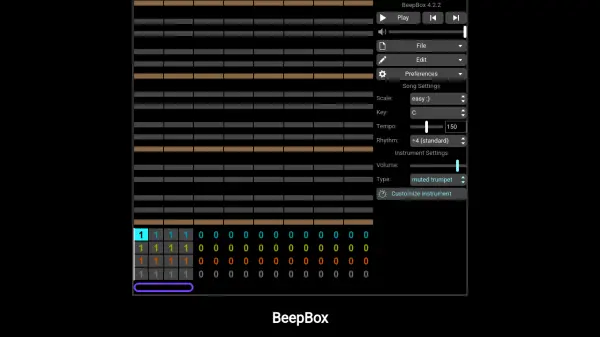
BeepBox is an online tool designed for sketching and sharing instrumental music. It operates entirely within the browser, with all song data embedded in the URL, allowing users to save and share their creations by simply copying and pasting the link. The tool features a pattern-based editor where users can add, remove, and edit notes, with automatic playback for real-time feedback. It supports multiple rows for melodies, harmonies, and drums, along with advanced controls like pitch bending, volume adjustment, and keyboard shortcuts for efficient workflow.
BeepBox emphasizes user privacy and ownership, as no data is stored on servers—songs remain on the user's device unless shared via URL. It is developed as a passion project by John Nesky and is committed to remaining free. Additional features include an offline downloadable version, open-source availability under the MIT license, and an archive of user-shared songs for inspiration.
Features
- Pattern-Based Editor: Edit notes in patterns with real-time playback and support for melodies, harmonies, and drums.
- URL-Based Storage: All song data is contained in the URL for easy saving, sharing, and no server-side storage.
- Advanced Controls: Includes pitch bending, volume adjustment, chord creation, and keyboard shortcuts for efficient editing.
- Privacy-Focused: No data collection or tracking; songs remain on the device unless shared via URL.
- Free and Open Source: Always free to use with downloadable offline version and source code available under MIT license.
Use Cases
- Creating simple instrumental tracks for personal projects or hobbies.
- Sharing music compositions with others via URL links.
- Learning music composition basics through an intuitive online interface.
- Prototyping melodies or harmonies for more advanced music production.
- Using in educational settings to teach music theory and digital music creation.
FAQs
-
How do I save my songs in BeepBox?
Songs are saved automatically in the URL; copy and paste the URL to save and share your song. -
Can I use BeepBox offline?
Yes, you can download an offline version of BeepBox for use without internet access. -
Does BeepBox collect any user data?
No, BeepBox does not collect, track, or share any user data; all song data stays on your device unless shared via URL. -
Is BeepBox free to use?
Yes, BeepBox is a free tool and will always remain free, though gratuities are appreciated. -
Can I use BeepBox songs in my own projects?
Yes, you can use the open-source synth code to play BeepBox songs in your JavaScript projects under the MIT license.