

What is Autohive?
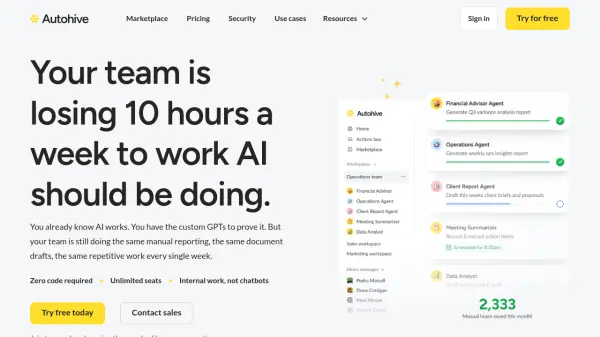
Autohive is a platform that empowers teams to build and deploy custom AI agents for automating internal workflows such as reporting, document generation, data formatting, and operational tasks. No coding or technical expertise is required, making it accessible to all team members. The platform offers a marketplace with pre-built agents tailored for specific business functions like finance, marketing, and operations, which can be customized to meet unique organizational needs.
Autohive integrates seamlessly with existing tools and provides a dedicated 'Agent Creator' that allows users to describe the work they need done in simple language, and the platform automatically builds an agent that matches their instructions and standards. With unlimited seats on every plan, businesses can scale automation across teams without per-user costs. Autohive also provides white-glove onboarding, dedicated success support, and live training to ensure smooth adoption.
Features
- No-Code Agent Builder: Create custom AI agents by simply describing the work in a prompt; the platform builds the agent automatically.
- Pre-Built Agent Marketplace: Ready-to-use agents for finance, marketing, operations, and more, configurable to your business standards.
- Unlimited Seats: Every plan offers unlimited users, so teams of any size can collaborate without per-user fees.
- Integrations: Works with tools your team already uses, enabling seamless workflow automation.
- White-Glove Onboarding: Dedicated onboarding service to map goals and set up agents and integrations.
- Dedicated Support: Priority email support and access to a comprehensive knowledge base on paid plans.
Use Cases
- Automate recurring financial reporting and analysis with a Warren Buffett-style agent.
- Generate optimized content and improve search engine visibility using an AEO Optimization agent.
- Identify and resolve operational bottlenecks to achieve 20-40% time savings with an Operational Efficiency Bot.
- Streamline document generation and data formatting tasks across the organization.
- Enable teams to create specialized agents for unique business processes without IT involvement.
FAQs
-
How do I know how many credits or how much storage I need?
Credit usage varies based on task complexity. Simple tasks like answering questions from uploaded documents use fewer credits than complex analysis or content generation. Freemium's 350k credits are sufficient for initial exploration, while Team's 18M credits support daily use across multiple team members. Storage needs depend on the volume of reference material you upload; 1GB holds thousands of text documents, while 100GB accommodates extensive libraries. -
Can I switch between plans at any time?
Yes. You can upgrade or downgrade your plan as needed. Upgrades take effect immediately with new features and credit limits. Downgrades apply at your next billing cycle, so you retain current benefits until then. -
Do I need a credit card to start with the Freemium plan?
No. You can sign up for Freemium without any payment information. No credit card is required to start building and testing AI agents. -
What happens if I hit my credit or usage limits?
You'll receive a warning email and see a banner in the app as you approach your limit. You can activate auto credit top-up with a chosen amount and maximum budget, or take no action and your work will pause until the next billing cycle. -
Do unused credits roll over to the next month?
Subscription credits renew each month and do not roll over. However, any top-up credits purchased last for a rolling 90 days. The system uses credits due to expire first.