What is apiDoc?
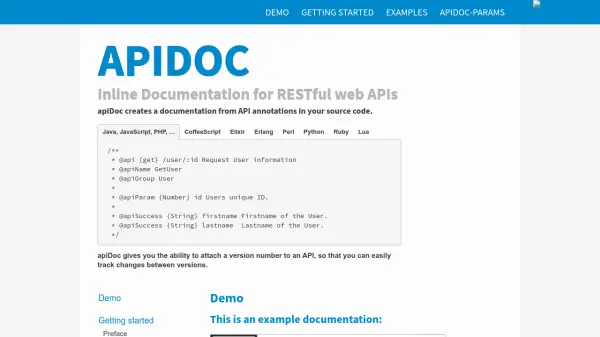
apiDoc is a powerful tool designed to automate the generation of documentation for RESTful web APIs by extracting structured comments and annotations from your application's source code. Supporting a wide range of programming languages, including JavaScript, Python, Java, PHP, Ruby, Go, and more, it enables developers to keep their documentation up to date with minimal manual intervention.
With flexible configuration options, versioning support, and customizable templates, apiDoc produces professional, easy-to-navigate documentation that includes parameter details, success and error responses, and usage examples. The tool can be installed via npm and used through a command-line interface, allowing for integration with build environments and CI/CD pipelines, thereby improving developer workflow and output consistency.
Features
- Multilanguage Support: Parses source code from languages such as JavaScript, Python, Java, PHP, Ruby, Go, and more.
- Source Annotation Parsing: Generates documentation by reading specially formatted comments in the codebase.
- Versioning: Tracks changes and supports comparison between different API versions.
- Customizable Templates: Allows users to apply or create custom templates for generated documentation.
- Command Line Interface: Provides a flexible CLI with various input, output, filter, and configuration options.
- Reusable Documentation Blocks: Enables definition and inclusion of reusable documentation fragments via @apiDefine and @apiUse.
- Detailed Parameter & Response Documentation: Supports parameter, query, header, and response examples for comprehensive API docs.
- Integration with Grunt: Offers a dedicated Grunt module for workflow automation.
- Configuration via JSON: Settings and project metadata are easily managed through apidoc.json or package.json.
Use Cases
- Automatically generate up-to-date RESTful API documentation during software development.
- Facilitate collaborative backend and frontend API development by maintaining synchronized documentation.
- Track, compare, and communicate changes across different versions of an API.
- Create internal or public API portals for developer onboarding or third-party integration.
- Integrate API documentation generation into continuous integration and deployment pipelines.
FAQs
-
Which programming languages are supported?
apiDoc supports documentation generation from source code written in JavaScript, Java, Python, PHP, Ruby, Go, C#, Dart, TypeScript, Elixir, Erlang, Perl, Lua, and any language supporting Javadoc-style comments. -
How are configuration options set for apiDoc?
Configuration is managed with an optional apidoc.json file or directly within the package.json in Node.js projects, allowing specification of project metadata, template settings, header/footer content, and more. -
Can templates be customized in apiDoc?
Yes, users can apply the default template, bring their own templates, or customize aspects such as version comparison and navigation to tailor the documentation output. -
Does apiDoc support API version comparison?
apiDoc includes built-in support for maintaining and comparing API documentation across different versions, highlighting differences for easy review and updates. -
How is apiDoc installed?
apiDoc can be installed globally using npm with the command 'npm install apidoc -g'.