AI Badge
Promote Transparency in AI-Generated Imagery

What is AI Badge?

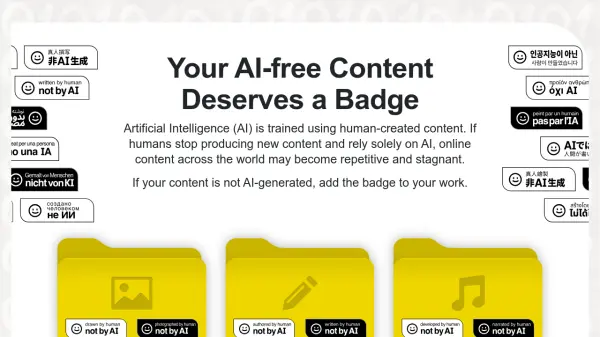
AI Badge provides a universally recognizable badge to denote images created using artificial intelligence. This initiative aims to promote transparency in the use of AI-generated content. The badge is freely licensed under a CC0 1.0 license, allowing for unrestricted use and modification.

The creator encourages users to visibly display the badge on AI-generated images. Guidance is provided regarding optimal badge size and placement to ensure clear visibility, suggesting a minimum size of 5% of the image width and positioning in the bottom-right corner.

Features

  • Freely-licensed Badge: Available under a CC0 1.0 license, making it free to use and modify.
  • Universal Recognition: Designed to be easily identifiable as an indicator of AI-generated content.
  • Usage Guidance: Provides suggestions for optimal size and placement for maximum visibility.
  • Transparency Promotion: Helps clearly identify AI-created images.

Use Cases

  • Marking AI-generated artwork shared online.
  • Indicating AI-created images in presentations.
  • Labeling AI-generated content in publications.
  • Identifying AI generated photos

Related Tools:

Blogs:

  • Chat with PDF AI Tools

    Chat with PDF AI Tools

    Easily interact with your PDF documents using our advanced AI-powered tool. Whether you're reading lengthy reports, research papers, contracts, or eBooks, our platform lets you chat directly with your PDF files, ask questions, extract insights, and get summaries in real-time.

  • Long Videos into Viral Shorts

    Long Videos into Viral Shorts

    Klap.app is an AI-powered video editing tool that transforms long-form videos into engaging short clips optimized for platforms like TikTok, Instagram Reels, and YouTube Shorts

  • Top 6 AI note-taking tools for 2026: in-person, online, and hybrid use cases

    Top 6 AI note-taking tools for 2026: in-person, online, and hybrid use cases

    Most AI note-taking lists are really lists of meeting bots, which join your video call and transcribe it. That's useful, but it's half the picture. Decisions happen in hallway conversations, client dinners, on-site visits, and hybrid rooms where nobody is on a video link. This guide covers different parts of the note-taking workflow: hardware capture for in-person settings, platform-native tools for online calls, and AI layers for organizing and synthesizing what you've captured. It compares six tools by capture context, workflow fit, pricing, and limitations.

Didn't find tool you were looking for?

Be as detailed as possible for better results