Agent skill
lit-sheet-music
Learn how to create a Lit web component that renders MusicXML using OpenSheetMusicDisplay, allowing you to display sheet music dynamically from a source attribute or inline XML.
Install this agent skill to your Project
npx add-skill https://github.com/rodydavis/skills/tree/main/skills/lit-sheet-music
Metadata
Additional technical details for this skill
- last modified
- Tue, 03 Feb 2026 20:04:18 GMT
SKILL.md
Lit Sheet Music
In this article I will go over how to set up a Lit web component and use it to render musicxml from a src attribute or inline xml using opensheetmusicdisplay.

Now any sheet music can be rendered based on the browser width as an svg or canvas (and will resize when the viewport changes).
Prerequisites
- Vscode
- Node >= 16
- Typescript
Getting Started
We can start off by navigating in terminal to the location of the project and run the following:
npm init @vitejs/app --template lit-ts
Then enter a project name lit-sheet-music and now open the project in vscode and install the dependencies:
cd lit-sheet-music
npm i lit opensheetmusicdisplay
npm i -D @types/node
code .
Update the vite.config.ts with the following:
import { defineConfig } from "vite";
import { resolve } from "path";

export default defineConfig({
  base: "/lit-sheet-music/",
  build: {
    lib: {
      entry: "src/lit-sheet-music.ts",
      formats: ["es"],
    },
    rollupOptions: {
      input: {
        main: resolve(__dirname, "index.html"),
      },
    },
  },
});
Template
Open up the index.html and update it with the following:
<!DOCTYPE html>
<html lang="en">
  <head>
    <meta charset="UTF-8" />
    <link rel="icon" type="image/svg+xml" href="/src/favicon.svg" />
    <meta name="viewport" content="width=device-width, initial-scale=1.0" />
    <title>Lit Sheet Music</title>
    <script type="module" src="/src/sheet-music.ts"></script>
    <style>
      body {
        margin: 0;
        padding: 0;
      }
    </style>
  </head>

  <body>
    <sheet-music
      src="https://raw.githubusercontent.com/opensheetmusicdisplay/opensheetmusicdisplay/develop/demo/BrahWiMeSample.musicxml"
    >
    </sheet-music>
  </body>
</html>
If local musicxml is intended to be used update index.html with the following:
<!DOCTYPE html>
<html lang="en">
<head>
<meta charset="UTF-8" />
<link rel="icon" type="image/svg+xml" href="/src/favicon.svg" />
<meta name="viewport" content="width=device-width, initial-scale=1.0" />
<title>Lit Sheet Music</title>
<script type="module" src="/src/sheet-music.ts"></script>
<style>
body {
margin: 0;
padding: 0;
}
</style>
</head>
<body>
<sheet-music>
<script type="text/xml">
<?xml version="1.0" standalone="no"?>
<!DOCTYPE score-partwise PUBLIC
"-//Recordare//DTD MusicXML Partwise//EN"
"http://www.musicxml.org/dtds/partwise.dtd">
<score-partwise>
<part-list>
<score-part id="P1">
<part-name>Voice</part-name>
</score-part>
</part-list>
<part id="P1">
<measure number="0" implicit="yes">
<attributes>
<divisions>4</divisions>
<key>
<fifths>-3</fifths>
<mode>major</mode>
</key>
<time>
<beats>2</beats>
<beat-type>4</beat-type>
</time>
<clef>
<sign>G</sign>
<line>2</line>
</clef>
<directive>Langsam, innig.</directive>
</attributes>
<note>
<pitch>
<step>G</step>
<octave>4</octave>
</pitch>
<duration>2</duration>
<type>eighth</type>
<stem>up</stem>
<notations>
<dynamics>
<p/>
</dynamics>
</notations>
<lyric>
<syllabic>single</syllabic>
<text>Wärst</text>
</lyric>
</note>
</measure>
<measure number="1">
<note>
<pitch>
<step>F</step>
<octave>4</octave>
</pitch>
<duration>3</duration>
<type>eighth</type>
<dot/>
<stem>up</stem>
<lyric>
<syllabic>single</syllabic>
<text>du</text>
</lyric>
</note>
<note>
<pitch>
<step>E</step>
<alter>-1</alter>
<octave>4</octave>
</pitch>
<duration>1</duration>
<type>16th</type>
<stem>up</stem>
<lyric>
<syllabic>single</syllabic>
<text>nicht,</text>
</lyric>
</note>
<note>
<pitch>
<step>E</step>
<alter>-1</alter>
<octave>4</octave>
</pitch>
<duration>2</duration>
<type>eighth</type>
<stem>up</stem>
<lyric>
<syllabic>begin</syllabic>
<text>heil</text>
</lyric>
</note>
<note>
<pitch>
<step>B</step>
<alter>-1</alter>
<octave>4</octave>
</pitch>
<duration>1</duration>
<type>16th</type>
<stem>up</stem>
<beam number="1">begin</beam>
<beam number="2">begin</beam>
<notations>
<slur type="start" number="1"/>
</notations>
<lyric>
<syllabic>end</syllabic>
<text>ger</text>
<extend/>
</lyric>
</note>
<note>
<pitch>
<step>G</step>
<octave>4</octave>
</pitch>
<duration>1</duration>
<type>16th</type>
<stem>up</stem>
<beam number="1">end</beam>
<beam number="2">end</beam>
<notations>
<slur type="stop" number="1"/>
</notations>
<lyric>
<extend/>
</lyric>
</note>
</measure>
</part>
</score-partwise>
</script>
</sheet-music>
</body>
</html>
We are passing a src attribute to the web component for this example but we can also add a script tag with the type attribute set to text/xml with the contents containing the json.
Web Component
Before we update our component we need to rename my-element.ts to sheet-music.ts
Open up sheet-music.ts and update it with the following:
import { html, css, LitElement } from "lit";
import { customElement, property, query } from "lit/decorators.js";
import { IOSMDOptions, OpenSheetMusicDisplay } from "opensheetmusicdisplay";

type BackendType = "svg" | "canvas";
type DrawingType = "compact" | "default";

@customElement("sheet-music")
export class SheetMusic extends LitElement {
  _zoom = 1.0;

  @property({ type: Boolean }) allowDrop = false;
  @property() src = "";

  @query("main") canvas!: HTMLElement;

  controller?: OpenSheetMusicDisplay;
  options: IOSMDOptions = {
    autoResize: true,
    backend: "canvas" as BackendType,
    drawingParameters: "default" as DrawingType,
  };

  static styles = css`
    main {
      overflow-x: auto;
    }
  `;

  render() {
    return html`<main></main>`;
  }

  async renderMusic(content: string) {
    if (!this.controller) return;
    await this.controller.load(content);
    this.controller.zoom = this._zoom;
    this.controller.render();
    this.requestUpdate();
  }

  private async getMusic(): Promise<string> {
    // Check if src attribute is set and prefer it over the slot
    if (this.src.length > 0) return fetch(this.src).then((res) => res.text());

    // Check if slot children exist and return the xml
    const elem = this.parentElement?.querySelector(
      'script[type="text/xml"]'
    ) as HTMLScriptElement;
    if (elem) return elem.innerHTML;

    // Return nothing if neither is found
    return "";
  }

  async firstUpdated() {
    this.controller = new OpenSheetMusicDisplay(this.canvas, this.options);
    this.requestUpdate();

    // Check for any music and update if found
    const music = await this.getMusic();
    if (music.length > 0) this.renderMusic(music);
  }
}

declare global {
  interface HTMLElementTagNameMap {
    "sheet-music": SheetMusic;
  }
}
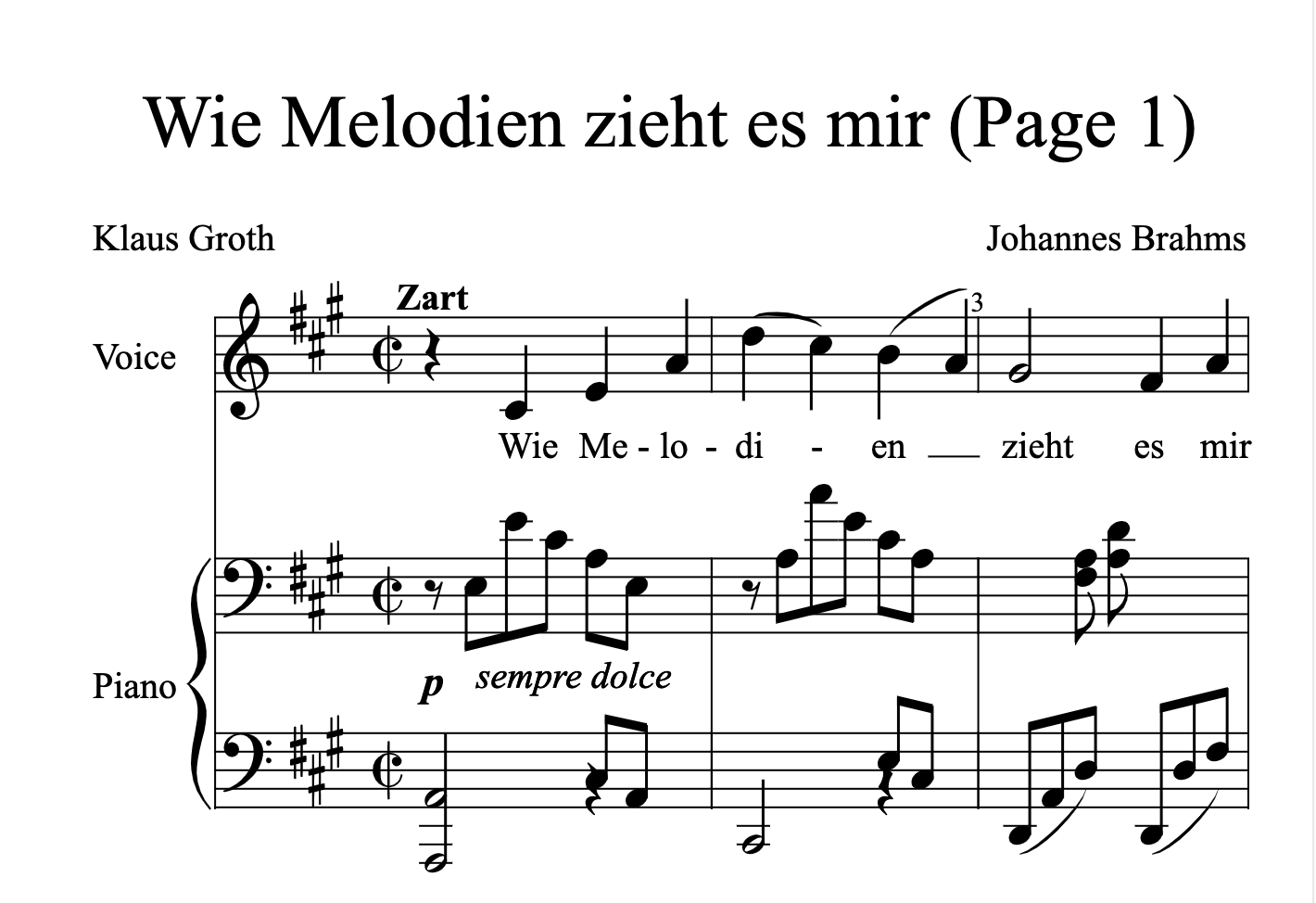
Run npm run dev and the following should appear if all went well:
Conclusion
If you want to learn more about building with Lit you can read the docs here.
The source for this example can be found here.

Recommended Agent Skills
Expand your agent's capabilities with these related and highly-rated skills.
 rodydavis/skills
how-to-do-offline-recommendations-with-sqlite-and-gemini
Learn how to enhance your CMS like PocketBase with AI-powered content recommendations using text embeddings, SQLite, and k-nearest neighbor search for efficient and scalable related content suggestions.
rodydavis/skills
how-to-build-a-webrtc-signal-server-with-pocketbase
Learn how to build a simple WebRTC video call application using PocketBase as a signaling server, enabling peer-to-peer communication with SQLite on the server and realtime updates via Server Sent Events.
rodydavis/skills
flutter-terminal-cheat-sheet
This post provides a handy collection of Flutter commands and scripts for web development, package creation, troubleshooting, testing, and more, streamlining your Flutter workflow.
rodydavis/skills
how-to-print-multiple-objects-to-the-console-with-print-in-dart
Learn how to print multiple objects to the console in Dart using Records, offering a similar experience to JavaScript's `console.log()` functionality.
rodydavis/skills
flutter-input-output-preview
Build responsive Flutter apps with a reusable `TwoPane` widget and an `InputOutputPreview` component for side-by-side code and preview display on both mobile and desktop.
rodydavis/skills
displaying-html-in-flutter
Easily display and interact with HTML content in your Flutter app using the `easy_web_view` package, which supports both web and mobile platforms.
Didn't find tool you were looking for?