YoBuddy favicon

YoBuddy
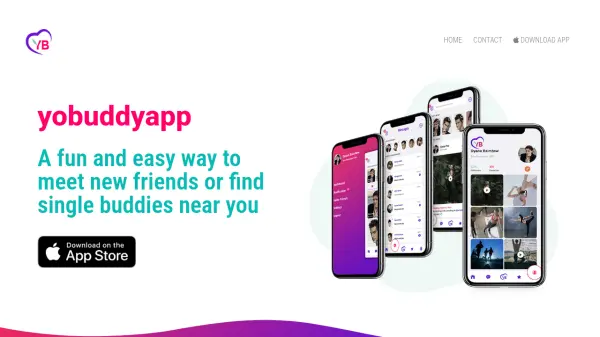
A fun and easy way to meet new friends or find single buddies near you

What is YoBuddy?

YoBuddy provides a social platform designed for cannabis enthusiasts to connect with new friends or potential dates nearby. It uses a map interface to discover users with similar interests and preferences, making it easy to find buddies for socializing. The app emphasizes a relaxed and fun experience with features like chill chat and interest-based matching.

Features

  • Map-Based Discovery: View other users nearby on an interactive map.
  • Interest Matching: Connect with people who share common interests and preferences.
  • Chill Chat: Communicate with matched buddies through a simple chat function.

Use Cases

  • Meeting new friends who enjoy cannabis.
  • Finding a date with similar interests.
  • Networking with other cannabis enthusiasts in your area.
  • Exploring social connections in a new city.

FAQs

  • Is YoBuddy only for cannabis users?
    YoBuddy is primarily designed for cannabis enthusiasts, but anyone looking to connect with like-minded individuals can join.
  • How does the map discovery work?
    The map shows other users nearby based on your location, allowing you to see profiles and connect with those sharing similar interests.
  • Is there a cost to use YoBuddy?
    The app is free to download and use.

Related Tools:

Blogs:

  • Top AI tools for Students

    Top AI tools for Students

    These AI tools are designed to enhance the learning experience for students. From personalized study plans to intelligent tutoring systems.

  • Best text to speech AI tools

    Best text to speech AI tools

    Text-to-speech (TTS) AI tools are designed to convert written or text-based content into natural-sounding spoken audio. These tools utilize various deep learning and neural network architectures to generate human-like speech from textual input.

  • Top 6 AI note-taking tools for 2026: in-person, online, and hybrid use cases

    Top 6 AI note-taking tools for 2026: in-person, online, and hybrid use cases

    Most AI note-taking lists are really lists of meeting bots, which join your video call and transcribe it. That's useful, but it's half the picture. Decisions happen in hallway conversations, client dinners, on-site visits, and hybrid rooms where nobody is on a video link. This guide covers different parts of the note-taking workflow: hardware capture for in-person settings, platform-native tools for online calls, and AI layers for organizing and synthesizing what you've captured. It compares six tools by capture context, workflow fit, pricing, and limitations.

Didn't find tool you were looking for?

Be as detailed as possible for better results