What is Sprite Fusion?
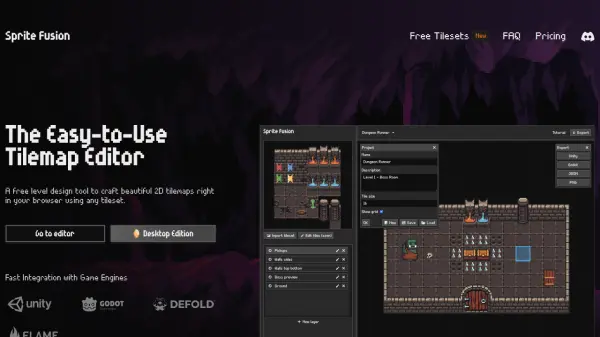
Sprite Fusion is a free tool for creating 2D tilemaps directly in your browser. This level design editor emphasizes simplicity and art direction, enabling the rapid design of levels with imported tilesets and built-in features.
The editor includes support for features like auto-tiling, collision setting. It offers seamless exports compatible with major game engines, making integration effortless.
Features
- Import any tileset: Load tilesets using simple Drag-and-Drop or clipboard paste.
- Tile Map Editor: Craft levels using an intuitive tile map editor with single or multiple tile selections.
- Export in one click: Directly export your map as a native Unity, Godot or Defold tilemap.
- Auto Tile: Includes an easy-to-use auto tile system for swift terrain design.
- Seamless Game Engine exports: Export your tilemap as a Unity package, Godot scene or Defold assets.
Use Cases
- Designing levels for 2D platformer games.
- Creating maps for RPGs.
- Developing retro games with built-in helpers for GB Studio.
- Building tilemaps for mobile games using Defold.
- Quickly prototyping game levels with auto-tiling features.
FAQs
-
What is Sprite Fusion?
Sprite Fusion is a free tilemap editor and game design tool. It allows you to design 2D maps for your games, and export them to Unity or Godot or any game engine. -
What is a tilemap?
A tilemap is a 2D map made of tiles. Tiles are small images that are repeated to create a map. Tilemaps are used in many games, from platformers to RPGs. -
How much does it cost?
Sprite Fusion is free (woot!) and you don't need to create an account to use it. -
Does Sprite Fusion support collisions?
Yes, Sprite Fusion supports collisions. You can set any layer as a collider to use collisions in your game. -
What is Auto-tiling?
Auto-tiling is a feature that allows you to automatically place tiles based on their neighbors. It is useful to quickly design terrain map.