What is Serial Studio?
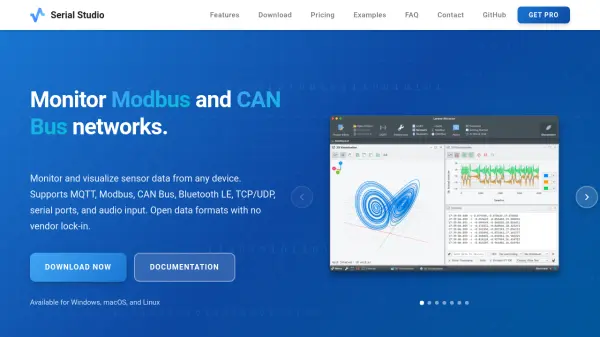
Serial Studio is a professional data visualization tool designed for embedded systems and IoT applications. It enables real-time monitoring and visualization of sensor data from various devices with support for multiple communication protocols including MQTT, Modbus, CAN Bus, Bluetooth LE, TCP/UDP, serial ports, and audio input.
The tool features a visual project editor for configuring dashboards without programming, though it offers optional JavaScript support for custom data parsing. It provides high-performance visualization at 60 FPS with sub-50ms latency and includes data export capabilities to CSV or MDF4 files for further analysis in tools like Excel, Python, or MATLAB.
Features
- Real-Time Visualization: Display live sensor data at 60 FPS with sub-50ms latency supporting CSV, JSON, and binary data formats
- Multiple Communication Protocols: Support for Serial/UART, Bluetooth LE, MQTT, Modbus TCP/RTU, CAN Bus, TCP/UDP sockets, and audio input
- Visual Project Editor: Configure dashboards using a visual interface with optional JavaScript support for custom data parsing
- Wide Range of Widgets: Includes line plots, bar charts, gauges, GPS maps, FFT analyzers, accelerometers, gyroscopes, and compass widgets
- Data Export & Playback: Record sessions to CSV or MDF4 files with playback capability for later analysis
- Custom Data Parser: Implement JavaScript parsers to decode proprietary binary protocols, checksums, and custom data structures
- API & Automation: Control via TCP API on port 7777 with JSON commands for automated testing and integration
Use Cases
- Monitoring Arduino sensor data with real-time dashboards
- Live GPS tracking with interactive maps and telemetry
- Industrial PLC monitoring via Modbus TCP/RTU connections
- Vehicle diagnostics through CAN Bus with DBC file import
- IoT dashboard creation for MQTT-based home automation projects
- Educational visualization of chaotic systems like Lorenz attractors
- Audio signal analysis using FFT spectrum analyzers
FAQs
-
What platforms does Serial Studio support?
Serial Studio supports Windows 10/11, macOS 11+ (both Intel and Apple Silicon), and Linux x64/ARM64 platforms with simultaneous updates across all systems. -
Can I use Serial Studio without programming knowledge?
Yes, the visual Project Editor allows dashboard configuration without programming. JavaScript support is available for custom binary protocol parsing but is optional. -
Is Serial Studio suitable for commercial projects?
Yes, commercial use of pre-compiled binaries requires a Pro license. Alternatively, you can build from source under GPL-3.0 terms for open source projects. -
What data export formats are available?
Serial Studio supports CSV and MDF4 export formats. All exported data is automatically timestamped for analysis in Excel, Python, MATLAB, or other tools. -
How can I control Serial Studio programmatically?
The built-in TCP API Server on port 7777 accepts JSON commands to configure settings, manage connections, and control data export for automated testing and integration.