What is Product Wing?
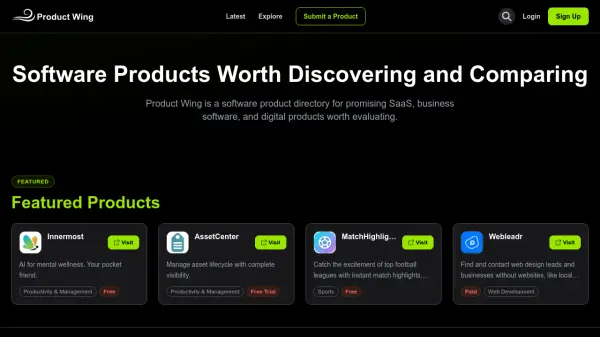
Product Wing serves as a curated directory for software products, focusing on SaaS, business software, and digital tools that merit closer evaluation. The platform is designed to help users explore beyond well-known options by highlighting products with strong functionality and clear value across categories such as marketing, productivity, analytics, customer support, development, and team collaboration.
It provides detailed listings and context to facilitate comparison, making it useful for startup founders, product managers, and team leads seeking alternatives or better options in underserved markets. The directory is continuously updated to ensure accuracy and comprehensiveness, offering a structured way to discover software based on quality, pricing, and workflow fit.
Features
- Software Directory: Comprehensive listings of SaaS, business software, and digital products
- Product Comparison: Tools to compare products based on categories, pricing, and use cases
- Category Filtering: Browse products across diverse categories like AI Assistants, Marketing, Productivity, and more
- Free Discovery: Completely free browsing, viewing listings, and comparing products
- Regular Updates: Directory updated multiple times per week with new products and refreshed listings
Use Cases
- Discovering emerging software alternatives in specific markets
- Comparing software products for business or personal use
- Researching SaaS tools for startup or team implementation
- Finding digital products with strong functionality and value
- Evaluating software based on pricing and workflow fit
FAQs
-
What types of software products are listed on Product Wing?
Product Wing covers software products across SaaS, apps, business software, and promising digital products. -
How can users compare products on Product Wing?
Users can use category and pricing filters to narrow options, then compare listings that serve the same use case or part of their software stack. -
Who is the target audience for Product Wing?
The directory is useful for people who want a structured way to discover and compare software with clearer categories and product context, such as startup founders, product managers, and team leads. -
Can I submit my own product to Product Wing?
Yes, you can submit your product through the submission page, and it will be reviewed before being added to the directory. -
How often is the Product Wing directory updated?
New products are added and existing listings are updated multiple times per week to keep the directory current, accurate, and comprehensive.