What is Local Proxy Inspector?
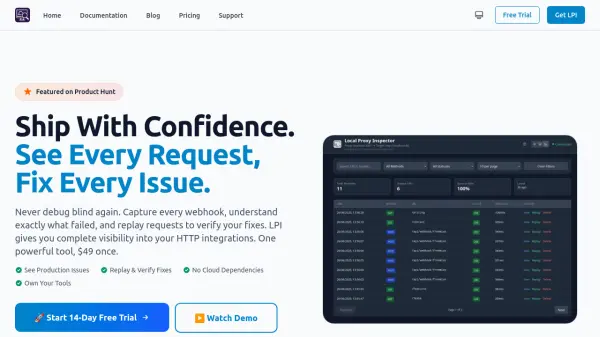
Local Proxy Inspector (LPI) provides developers with comprehensive visibility into HTTP integrations by capturing every webhook request and response. This tool enables real-time debugging through a web interface where users can inspect headers, body content, and metadata to understand exactly why integrations succeed or fail.
With features like instant replay, mock mode, and WebSocket support, LPI allows developers to verify fixes immediately, test integrations before backend readiness, and debug real-time connections. All data is stored locally in SQLite format, ensuring complete data ownership and privacy without any cloud dependencies or usage limits.
Features
- Real-time Web UI: Watch webhook traffic as it happens with a built-in web interface
- Complete Request Visibility: See every detail including headers, body, and metadata for all HTTP requests
- Instant Replay: Replay failed webhooks immediately to verify fixes work correctly
- Mock Mode: Test integrations before backend is ready by simulating webhook scenarios
- Local Data Storage: All webhook data stored locally in SQLite with no cloud dependencies
- WebSocket Support: Debug real-time connections with full visibility alongside HTTP traffic
- Smart Detection: Automatically understand any webhook format with intelligent formatting
- Production Ready: Handles proxy headers correctly and works with existing infrastructure
Use Cases
- Debugging production webhook issues in real-time
- Testing Stripe, GitHub, Shopify, or other webhook integrations
- Verifying fixes for failed webhook handlers
- Developing webhook integrations before backend APIs are ready
- Debugging WebSocket connections for real-time applications
- Maintaining compliance in healthcare (HIPAA) or finance (PCI) environments
- Debugging in air-gapped or restricted network environments
- Managing multiple client integrations or microservices simultaneously
FAQs
-
How does LPI compare to ngrok?
LPI provides complete control and ownership with local data storage, no usage limits, and works offline, while ngrok requires a monthly subscription, has request limits, and stores data in the cloud. -
What platforms does LPI support?
LPI runs on Windows, macOS, and Linux as a single binary with no dependencies, available for both x64 and ARM64 architectures. -
Can LPI be used for production debugging?
Yes, LPI provides complete visibility into production webhooks, allowing real-time failure understanding and request replay without compromising security or performance. -
What's included in the $49 license?
The license includes unlimited instances, unlimited requests, offline debugging, webhook replay, mock responses, and all v1.x updates for lifetime use. -
How does the webhook replay feature work?
LPI captures exact requests and allows one-click replay to test error handling and validate fixes without waiting for webhooks to fire again.