What is Django Helper?
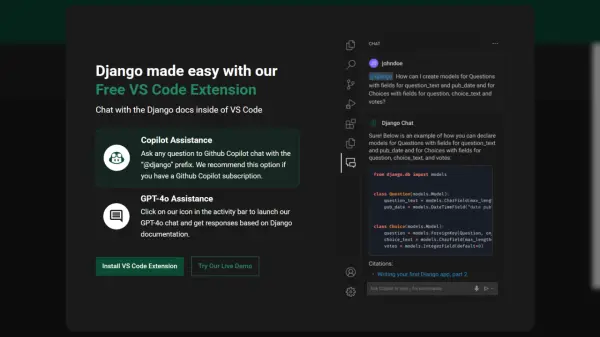
Django Helper is a Visual Studio Code extension designed to streamline the development process for Django developers. It integrates seamlessly into the VS Code environment, providing quick access to Django documentation through a chat interface.
Developers can leverage the power of GPT-4o or GitHub Copilot (subscription required) to ask questions and receive answers based on the official Django documentation. This eliminates the need to switch between the IDE and external documentation, enhancing productivity and workflow efficiency.
Features
- GPT-4o Assistance: Get answers based on Django documentation via a chat interface powered by GPT-4o.
- Copilot Assistance: Ask questions to Github Copilot chat with the “@django” prefix (requires Github Copilot subscription).
- VS Code Integration: Seamlessly integrates within the VS Code environment.
- Chat with Documentation: Interact directly with Django documentation within the IDE.
Use Cases
- Quickly finding answers to Django-related questions during development.
- Understanding specific Django functionalities without leaving the code editor.
- Improving development workflow by reducing context switching.
- Learning Django concepts and best practices.