What is ScreenshotX?
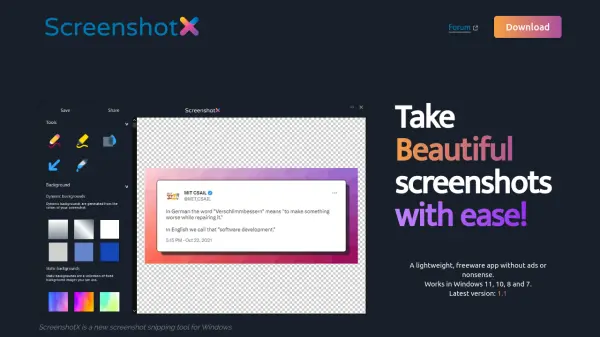
ScreenshotX is a freeware screenshot snipping tool for Windows that makes capturing beautiful screenshots effortless. It automatically detects solid color backgrounds and centers content, while offering a blur tool to redact sensitive information. Additional features include area and window snips, background customization, a brush tool, highlighter, and a color picker with complementary colors.
The app supports dark mode and light mode, includes 21 built-in language translations, and enables one-click sharing to the cloud without requiring an account. Shared screenshots are automatically removed after 30 days, and users can delete them manually. ScreenshotX is lightweight (3 MB), ad-free, spyware-free, and works on Windows 11, 10, 8, and 7.
Features
- Automatic Balancing: Detects solid color backgrounds and centers content automatically.
- Blur Tool: Redacts sensitive information from screenshots.
- Free Area and Window Snip: Captures any region or window.
- Background Customization: Adds a pretty background to screenshots.
- Brush Tool: Allows freehand drawing on screenshots.
- Highlight Tool: Highlights important parts of the screenshot.
- Color Picker: Shows complementary colors for design consistency.
- One-Click Sharing: Uploads screenshots to the cloud and generates a sharing URL.
- Language Support: Built-in translations for 21 languages.
- Lightweight and Free: No ads, spyware, or registration required.
Use Cases
- Creating professional-looking screenshots for documentation.
- Highlighting key areas in a screenshot for tutorials.
- Redacting personal or confidential information before sharing.
- Quickly sharing screenshots with colleagues via a URL.
- Designing social media posts with balanced and attractive images.
- Capturing error messages for technical support.
FAQs
-
Is ScreenshotX free?
Yes, ScreenshotX is completely freeware with no ads, spyware, or registration required. -
Which Windows versions does ScreenshotX support?
ScreenshotX works on Windows 11, 10, 8, and 7. -
How long do shared screenshots remain online?
Shared screenshots are automatically removed after 30 days. You can also delete them manually using the app or the administrative URL. -
Does ScreenshotX collect user data?
No, ScreenshotX does not collect any personal information or track you. The app is spyware-free. -
Does ScreenshotX support multiple languages?
Yes, it comes with 21 built-in language translations, including English, Chinese, German, Spanish, and more.
Related Queries
Helpful for people in the following professions
ScreenshotX Uptime Monitor
Average Uptime
100%
Average Response Time
1087.6 ms